

The Samsung T9 is the best external SSD for most buyers, thanks to its 2,000MB/s real-world speeds and rugged, pocketable build. Gamers should look at the PNY RP60 for fast load times without paying for Thunderbolt they won’t use, and Mac owners get the smoothest experience from the SanDisk Extreme Pro SSD with USB4, which taps into Apple’s high-bandwidth ports without a hiccup.
TL;DR:
- The Samsung T9 is suitable for most users due to its real-world speeds of 2,000MB/s, durability, and multiple capacity options, but it lacks Thunderbolt or USB4 support.
- The PNY RP60 offers fast load times for gaming at a lower price but lacks rugged features, making it ideal for desk setups rather than backpack use.
- Mac users benefit most from the SanDisk Extreme Pro SSD with USB4, which supports high bandwidth on Apple devices without compatibility issues, extending to recent MacBooks.
- Buyers should choose drives based on actual port speeds and use cases, avoiding high-spec drives if their hardware cannot leverage the full bandwidth, especially for workloads under 40Gbps.
- Durability features like rugged shells are most beneficial for outdoor or on-set work, while indoor or desk-based use can prioritize performance and capacity over ruggedization.
Table of Contents
- What Is the Best External SSD for Your Needs?
- Comparing the Top External SSD Picks Side by Side
- A Closer Look at Each Top Pick
- How Do You Choose the Right External SSD?
- How We Chose These External SSD Picks
- Where Atticus Goods Fits Into This Picture
- The Case Against Chasing Top Speed
- Shop External SSDs at Atticus Goods
- Sources
- FAQ
What Is the Best External SSD for Your Needs?
Ranking external SSDs by top speed alone misses the point. A drive that hits 3,800MB/s does nothing for you if your laptop only has a 10Gbps port. The picks below are ordered by how well they match real buying situations, not by whichever spec sheet has the biggest number.
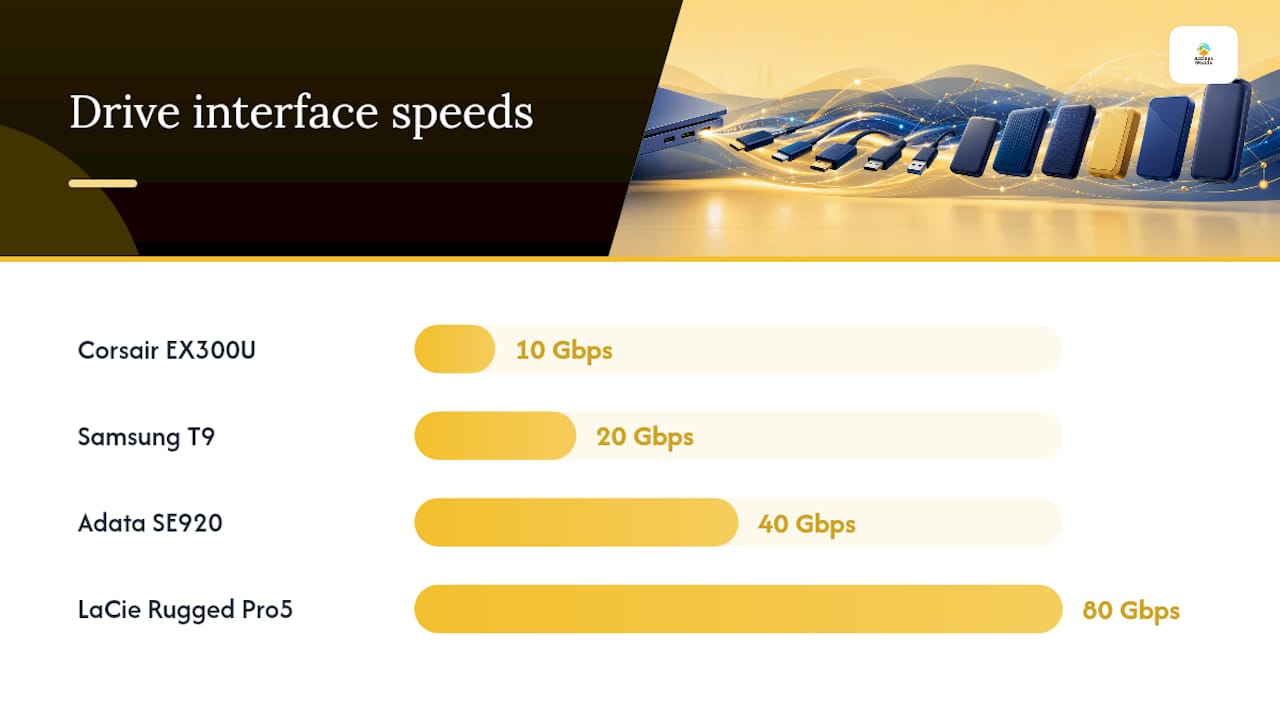
- Samsung T9 — Best overall. It delivers roughly 2,000MB/s sequential speeds over USB 3.2 Gen 2x2, fits in a shirt pocket, and survives a 2-meter drop. Capacities run from 1TB to 4TB.
- PNY RP60 — Best for gaming. A 20Gbps drive priced closer to a 10Gbps unit, it loads large game libraries fast without the Thunderbolt tax.
- SanDisk Extreme Pro SSD with USB4 — Best for Mac. USB4 support means it runs at full tilt on any recent MacBook without a Thunderbolt-specific driver quirk.
- Crucial X10 — Best for general backup. High-capacity options up to 4TB and consistent write performance make it a dependable everyday archive drive.
- Corsair EX300U — Best budget pick. A 10Gbps drive with real-world speeds that punch above its price, ideal for photo libraries and document backups.
- Adata SE920 — Best for pro creative workflows. Pre-populated 40Gbps USB4 storage that handles 4K and 8K footage without stuttering during sustained transfers.
- LaCie Rugged SSD Pro5 — Best for field production. Thunderbolt 5 and USB4 support at up to 80Gbps, wrapped in an IP-rated shell that shrugs off job-site abuse.
- Teamgroup X2 Max — Best for portability freaks. A thumb-drive-sized SSD with 10Gbps speed and both USB-A and USB-C connectors, so it works with almost anything you plug it into.
Comparable in-stock options across these same speed tiers are available with next-day shipping in many parts of the United States, so you’re not stuck waiting a week for a drive you need this weekend.
Beyond this shortlist, the wider external SSD comparison includes plenty of specialists worth knowing about: the ADATA Elite SE880 for budget USB4 speed, the SanDisk Desk Drive for 8TB desktop-style backup, the OWC Envoy Pro FX and SK hynix Tube T31 for compact everyday use, the WD Black D50 Game Dock NVMe SSD for console and PC gaming setups that need extra ports, and the Apricorn Aegis NVX and SecureDrive for buyers who need hardware encryption. Rugged specialists like the Asus TUF Gaming A2, LaCie Rugged SSD4, and Sharge Disk Pro round out the field for anyone working outside a climate-controlled office.
Comparing the Top External SSD Picks Side by Side
Here’s how the eight shortlisted drives stack up on the specs that actually change how they perform in daily use.
A few things jump out. Warranty length tracks price tier fairly closely: 10Gbps drives mostly carry 3-year coverage, while the 40 and 80Gbps units built for professional workloads stretch to 5 years. Ruggedization is inconsistent even among similarly priced drives. The PNY RP60 matches the Samsung T9 on interface speed but skips the IP rating entirely, so if you’re tossing a drive in a backpack daily, that detail matters more than the megabytes per second.
A Closer Look at Each Top Pick
Samsung T9: the safest default choice
The Samsung T9 earns its spot at the top because it doesn’t ask you to think hard about anything. It hits around 2,000MB/s in sustained transfers over USB 3.2 Gen 2x2, works identically well on Windows and Mac, and its fingerprint-lock model adds security without slowing you down.
- Best for: buyers who want one drive that handles photos, video, backups, and travel without a second thought
- Compatibility: needs a 20Gbps-capable port for full speed; runs fine at reduced speed on older 10Gbps or USB-C 3.0 ports
- Pro: consistent real-world performance that matches its advertised specs closer than most competitors
- Con: no Thunderbolt or USB4 support, so it caps out below the fastest tier available
The T9 is available in multiple capacities with fast nationwide shipping, which matters if you need it before a trip.
PNY RP60: gaming speed without the markup
Game libraries have ballooned past 100GB per title, and load times depend heavily on drive speed once you’re past the console’s internal storage. The PNY RP60 runs at a higher bandwidth than standard USB 3.2 Gen 2 drives, but sells for close to what 10Gbps drives cost a couple of years ago.
- Best for: PC and console gamers moving large installs on and off a single drive repeatedly
- Compatibility: needs a USB 3.2 Gen 2x2 port to hit rated speed; works on PS5 and most modern gaming laptops
- Pro: excellent price-to-speed ratio in the 20Gbps tier
- Con: lacks a rugged shell, so it’s better suited to a desk than a backpack
SanDisk Extreme Pro SSD with USB4: the Mac-first pick
Apple’s move to USB4 and Thunderbolt across recent MacBook lineups means a drive that officially supports USB4 avoids the compatibility quirks that plague generic USB-C drives on macOS. The SanDisk Extreme Pro SSD with USB4 supports high bandwidth suitable for recent MacBook models and comes with a 5-year warranty, longer than most drives in its price range.
- Best for: MacBook Pro and MacBook Air owners doing video editing, RAW photo work, or Time Machine backups
- Compatibility: full speed requires a USB4 or Thunderbolt 3/4 port; backward compatible with older USB-C ports at reduced speed
- Pro: rugged IP65 build survives dust and splashes on location shoots
- Con: you’re paying for bandwidth many casual users won’t fully use day to day
Crucial X10: the dependable backup workhorse
Crucial built its reputation on memory and storage components, and the X10 reflects that engineering focus rather than flashy design. It comes in capacities up to 4TB and holds sustained write speeds better than many drives in its price class.
- Best for: anyone building a straightforward backup routine for a laptop or desktop
- Compatibility: works across USB 3.2 Gen 2 ports on Windows, Mac, and Linux without extra drivers
- Pro: high-capacity options at a lower cost per terabyte than premium brands
- Con: not the fastest drive in its tier, so heavy video editors may notice lag on large 4K files
Corsair EX300U: proof that 10Gbps still has a place
Not every drive needs to chase the highest bandwidth number. The Corsair EX300U runs at a bandwidth suitable for everyday use and comes in a compact aluminum shell that dissipates heat better than plastic competitors, which helps it avoid the throttling that hurts sustained transfers on cheaper drives.
- Best for: everyday users backing up phones, documents, and photo libraries
- Compatibility: plug-and-play on any USB-C or USB-A (with adapter) port
- Pro: strong value once you account for its consistent real-world speed
- Con: not built for 4K or 8K video work where sustained write speed under load matters more
Adata SE920: pro-grade transfers without Thunderbolt pricing
The Adata SE920 ships pre-populated with NVMe storage supporting high USB4 bandwidth, putting it in the same performance bracket as some Thunderbolt drives at a lower price. According to PCWorld’s testing, pre-populated high-bandwidth drives can carry a premium over building your own enclosure, but they save the hassle of matching components yourself.
- Best for: video editors and photographers who need sustained 40Gbps transfers without Thunderbolt licensing costs
- Compatibility: needs a USB4-capable port for full speed; runs at reduced bandwidth on Thunderbolt 3 hosts
- Pro: handles large 4K and 8K file transfers without significant slowdown
- Con: benefits shrink fast if your computer only has 10Gbps or 20Gbps ports
LaCie Rugged SSD Pro5: the field-ready flagship
LaCie built its name on drives that survive drops, dust, and rain, and the Rugged SSD Pro5 adds Thunderbolt 5 and USB4 support at up to 80Gbps on top of that durability. Independent testing found the drive held up through freeze, drop, and soak trials without data loss, per Imaging Resource’s review.
- Best for: photographers and videographers working outdoors or on set where drops and dust are a daily risk
- Compatibility: full 80Gbps speed needs a Thunderbolt 5 host; still fast over USB4 on other systems
- Pro: extreme durability paired with genuinely top-tier bandwidth
- Con: most home users will never touch the bandwidth ceiling this drive offers
Teamgroup X2 Max: storage that disappears in your pocket
Shaped like an oversized USB stick, the Teamgroup X2 Max runs at bandwidth appropriate for a thumb-drive form factor despite its tiny size, and its dual USB-A and USB-C connectors mean it works on nearly any device without hunting for an adapter.
- Best for: students, commuters, and anyone who wants storage that clips onto a keychain
- Compatibility: works across almost any USB port thanks to the dual-connector design
- Pro: genuinely disappears in a pocket while still hitting 10Gbps speeds
- Con: capacities top out at 2TB, so it’s not built for large video libraries
Other names worth flagging by category: the Synology BeeDrive pairs with Synology NAS systems for automatic phone backups, the OWC Express 1M2 SSD and OWC Envoy Ultra Thunderbolt 5 target Mac-centric creative studios, the Lexar Professional Go Portable SSD With Hub adds extra ports for travelers tired of dongles, the Sonnet Echo 13 Thunderbolt 5 SSD Dock turns a bare NVMe drive into a desktop-class Thunderbolt 5 rig, and the SanDisk Pro Blade System and Verbatim TurboMetal SSD serve niche professional and industrial buyers who need modular or extreme-durability storage.
How Do You Choose the Right External SSD?
Most buyers overpay for bandwidth they can’t use. If your laptop tops out at a 10Gbps USB-C port, a Thunderbolt 5 drive rated for 80Gbps performs no better than a 10Gbps drive on that machine, and often costs three times as much.
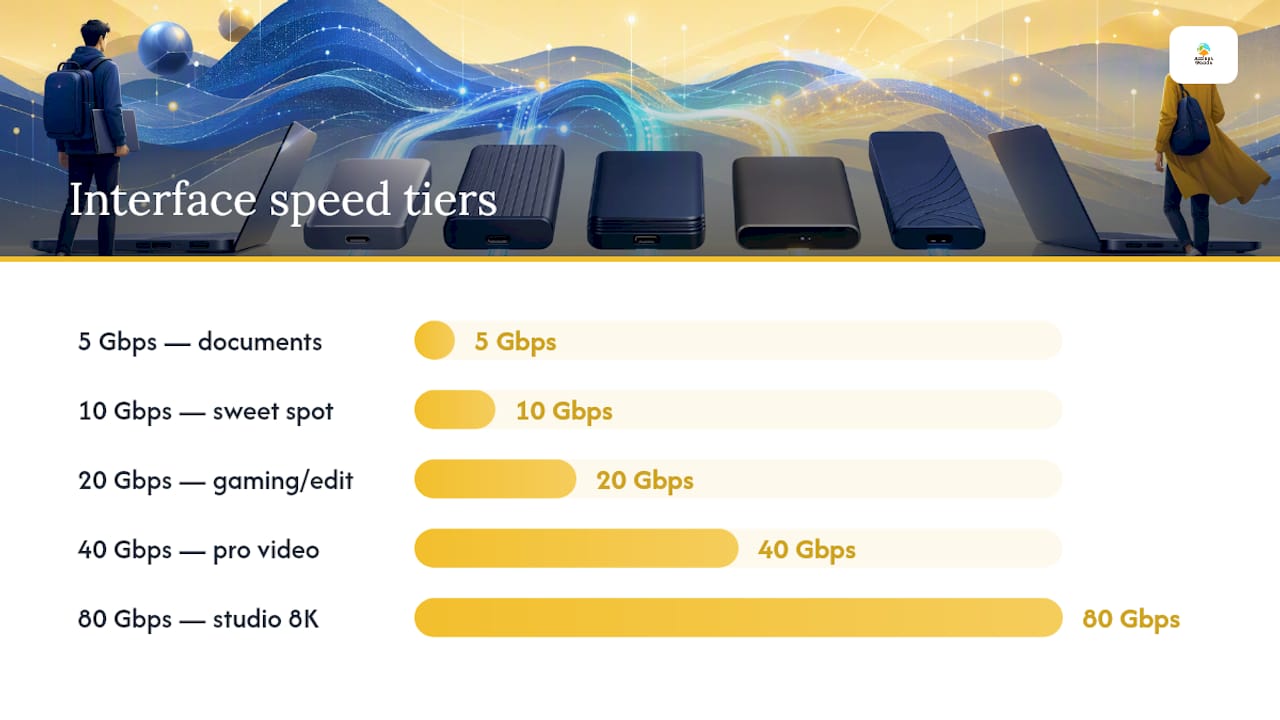
Interface speed tiers, and where they actually matter:
- 5Gbps (USB 3.0): fine for document backups and casual photo transfers, but slow for anything video-related
- 10Gbps (USB 3.2 Gen 2): the sweet spot for most people, covering everyday backups, photo libraries, and light video work
- 20Gbps (USB 3.2 Gen 2x2): worth it for gaming and moderate video editing where load times and export speed add up
- 40Gbps (USB4/Thunderbolt 3/4): built for professional video, large RAW photo batches, and multi-drive workflows
- 80Gbps (Thunderbolt 5): reserved for creative studios doing sustained 8K editing or multi-stream color work
Real-world speeds rarely match the number on the box. Host port limits, cable quality, and thermal throttling all chip away at advertised peaks, so expect noticeably lower sustained write speeds than the burst read numbers in marketing copy. A certified Thunderbolt cable makes a real difference here. Cheap or overly long cables can quietly cut your bandwidth in half even when both the drive and the port support full speed.
A 1TB external drive is usually enough for a full system image of a 1 to 2TB laptop SSD, since imaging tools compress heavily. Video editors working with uncompressed 4K or 8K footage should plan for 4TB or more from the start.
Durability ratings matter far less for a drive that lives on a desk than for one that travels. IP68-rated, shock-resistant builds add real value for field photographers and on-set video crews, but a desk-bound backup drive rarely needs that protection, and you’ll pay extra for a feature you’ll never test.
Pro Tip: If your computer only has 10Gbps ports, skip anything advertising 40Gbps or 80Gbps. You’ll pay a premium for headroom you can’t access, and a well-reviewed 10Gbps drive will feel just as fast in daily use.
For deeper detail on interface standards, our USB-C vs Thunderbolt breakdown covers which ports support which speeds across recent laptops.
How We Chose These External SSD Picks
Our shortlist leans on published lab benchmarks rather than marketing claims, cross-checked against what actually happens when a drive gets pushed hard for an extended session.
- Sustained file-copy tests: transferring large single files (10GB or more) to catch throttling that short burst tests miss
- Sequential vs. random read/write comparisons: since real backups and video exports depend more on sequential speed than the flashy random 4K numbers vendors often lead with
- Thermal throttling checks: compact drives without metal shells or active cooling tend to slow down significantly during extended transfers
- macOS compatibility checks: confirming a drive mounts, formats, and sustains speed correctly on Apple Silicon systems, not just Windows
- Port and cable variables: testing drives on both Thunderbolt and standard USB-C ports to see how much speed drops on non-ideal hosts
- Price and stock verification: confirming a pick is actually available at a reasonable price rather than listed at an inflated MSRP nobody pays
The biggest limitation across this entire category is the gap between vendor-claimed peak speeds and what a drive delivers once you factor in a real host port, a real cable, and a real multi-gigabyte file rather than a synthetic benchmark.
Where Atticus Goods Fits Into This Picture
When Matthew Vista put this list together, the priority list was compatibility first, sustained throughput second, and price-per-terabyte third. Peak burst speeds sit near the bottom because almost nobody’s daily workflow depends on them.
Atticus Goods approaches external storage the same way: stocking drives across every speed tier, from budget 10Gbps picks to Thunderbolt 5 flagships, so shoppers aren’t funneled toward whatever has the highest markup. Product pages list real specs alongside customer reviews, and fast shipping means you’re not stuck waiting two weeks for a drive you needed for a weekend shoot.
This roundup was built independently of any single manufacturer’s marketing materials, cross-referencing published lab results with real-world compatibility notes. Where a spec claim couldn’t be verified against outside testing, we said so rather than repeating a vendor number as fact.
The Case Against Chasing Top Speed
Most buying guides lead with top sequential speed because it’s the easiest number to put in a headline. That’s backwards. The far more useful question is: what port does your actual computer have, and how large are the files you move regularly?
A gamer copying 100GB game installs benefits enormously from 20Gbps over 10Gbps. A student backing up a photo library from a phone feels almost nothing. Conventional advice treats every buyer like they need a video editor’s drive, which pushes people toward Thunderbolt and USB4 models that sit unused at a fraction of their rated speed.
Prioritize the drive’s fit with your actual hardware first, and let use case, not spec sheet bragging rights, decide the rest. A rugged, mid-speed drive that survives your commute beats a fragile speed demon that dies after one drop. Buy for the job you actually do, not the job the marketing copy imagines you do.
— Matthew Vista
Shop External SSDs at Atticus Goods
A curated lineup across every speed tier is offered at prices that don’t punish you for buying the drive you actually need instead of the one with the flashiest spec sheet.

Every listing shows real specs, capacities, and customer reviews side by side, so you’re comparing apples to apples instead of guessing from a marketing page. Fast nationwide shipping means a drive ordered today typically lands before your next trip or shoot, not two weeks later. If you’re stocking up on the accessories that make external storage actually work well, the Netgear ProSAFE Auxiliary Power Supply is worth checking alongside your drive for anyone running a small home office setup with networked storage. Browse the current lineup, filter by capacity and interface, and get your next external SSD shipped this week.
Sources
- LaCie Rugged SSD4 review — Imaging Resource
- Best external drives 2026: Fast SSDs and roomy hard drives | PCWorld
FAQ
Which Is the Best External SSD Brand?
No single brand dominates every category. Samsung, SanDisk, and Crucial consistently rank well for general use, while LaCie and OWC lead on ruggedization and Thunderbolt performance for professional workflows.
What Are the Most Reliable External SSDs?
Drives with metal or reinforced shells, sustained-write performance that holds up under thermal load, and warranties of 3 years or longer tend to prove most reliable, with the Samsung T9 and Crucial X10 standing out in that group.
Should I Buy a 1TB or 2TB External SSD?
A 1TB drive suits a compressed full-system backup of a 1 to 2TB laptop, but video editors and anyone with a growing photo library should default to 2TB or larger.
Is WD or Seagate More Reliable?
Both brands post similar failure rates in independent testing, and the more meaningful difference usually comes down to the specific product line’s build quality and warranty length rather than the brand name alone.
Do I Need a Thunderbolt Drive for My Mac?
Only if you’re editing high-resolution video or moving very large files regularly. The SanDisk Extreme Pro SSD with USB4 delivers full-speed performance on modern Macs without the higher cost of a Thunderbolt-exclusive drive.