

For most PC builds, the CyberPower CP1500PFCLCD is the best overall pick: 1500VA with true sine-wave output that plays nice with Active PFC power supplies. On a budget, the Amazon Basics Standby UPS 800VA covers routers and light desktop gear for less. For high-end gaming rigs pulling serious wattage, stick with pure sine units in the 1500VA class. The reasoning boils down to three things: waveform compatibility, correct sizing, and honest runtime math.
TL;DR:
- A true sine-wave UPS like the CyberPower CP1500PFCLCD is essential for high-end gaming PCs with Active PFC power supplies, ensuring compatibility during outages.
- For lower-power setups such as routers or small desktops, budget models like the Amazon Basics Standby UPS 800VA provide reliable backup without unnecessary features.
- Always verify a UPS’s watt capacity against your system’s actual power draw, adding 20-30% buffer, since VA ratings can be misleading without considering the power factor.
- Line-interactive units with AVR are suitable for most home gaming and office needs, while pure sine-wave models are crucial for systems with Active PFC PSUs to prevent shutdowns.
- Runtime estimates are based on lab tests at specific loads; real-world performance varies depending on your PC’s actual wattage during use.
Table of Contents
- What Is the Best UPS for a PC in 2026?
- How Do You Read a UPS Spec Sheet?
- How Do You Pick the Right UPS for Your Setup?
- How We Picked These UPS Models
- When Does a UPS Actually Earn Its Keep?
- Where to Buy Your UPS and Accessories
- Sources
- FAQ
What Is the Best UPS for a PC in 2026?
Picking the right UPS is less about brand loyalty and more about matching three specs to your actual PC: waveform, VA/watt rating, and outlet count. Skip that step and you’ll end up with a $60 unit that shuts your gaming rig down the moment the power blinks, or a $300 unit protecting a router that barely draws 15 watts.
Here’s the shortlist that keeps showing up across independent reviews and testing, each one solving a different problem.
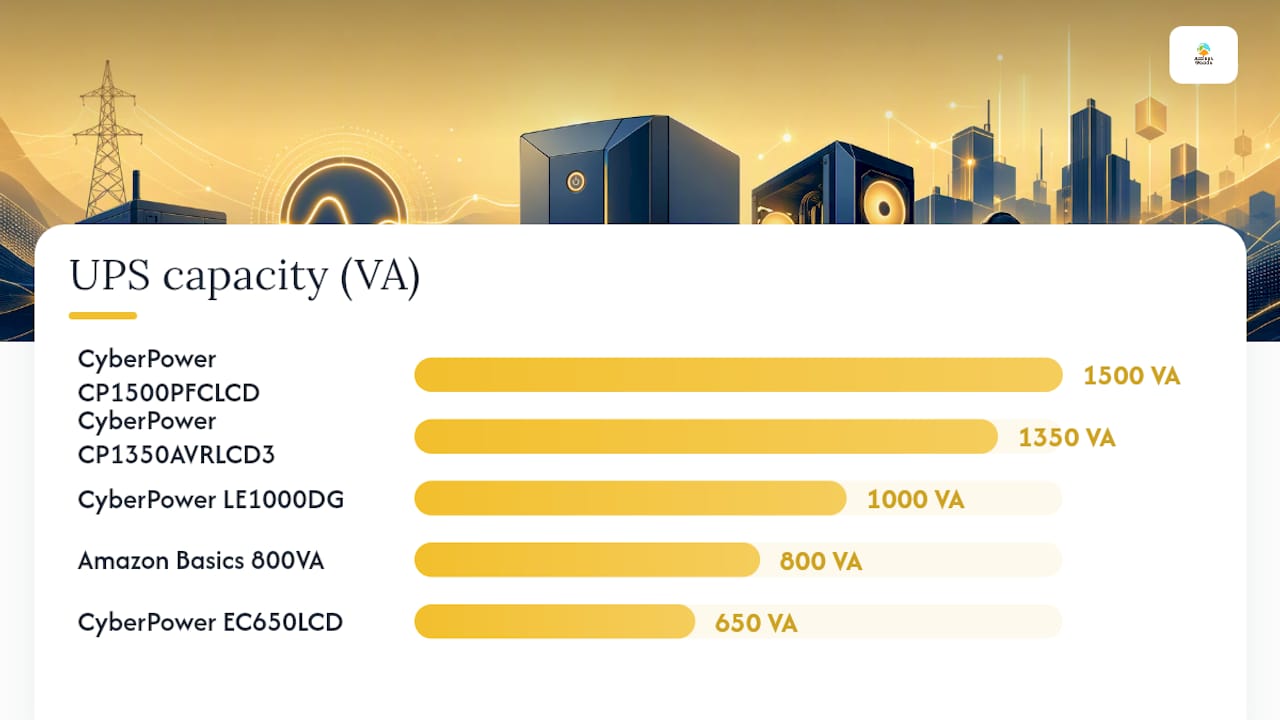
- CyberPower CP1500PFCLCD: 1500VA/1000W with true sine-wave output, best for mid-to-high-end gaming PCs
- CyberPower LE1000DG: 1000VA-class unit with AVR, best for home networks and small PC setups
- CyberPower CP1350AVRLCD3: higher-capacity AVR unit with LCD, best for larger home setups needing longer runtime
- CyberPower EC650LCD: 650VA compact unit, best for small desktops and networking gear
- APC BE600M1: 600VA entry-level protection, best for phones, small consoles, and light peripherals
- Amazon Basics Standby UPS 800VA: budget standby unit, best for routers and basic accessory backup
The CyberPower CP1500PFCLCD earns the top spot for a specific reason: it’s one of the few units in its price range with genuine true sine-wave output, which matters enormously if your power supply has Active PFC (nearly every 80+ Gold, Platinum, or Titanium unit does). At 1500VA and roughly 1000W, it lands squarely in the range reviewers consistently point to for mid-to-high-end gaming builds, with runtime in the 10 to 25 minute range at typical gaming loads. That’s enough time to save your work, alt-tab out of a raid boss, and shut down cleanly instead of losing progress to a flickering grid.
The CyberPower LE1000DG sits a notch below on capacity but covers a real gap: home networking gear plus a modest desktop. At roughly 1000VA with AVR (automatic voltage regulation), it smooths out brownouts without the price tag of the 1500VA models. It’s a sensible pick if your setup is a router, modem, and a work PC that doesn’t pull much power.
Step up to the CyberPower CP1350AVRLCD3 if you need more headroom than the LE1000DG offers but don’t need the full sine-wave commitment. The informative LCD display shows real-time load and estimated runtime, which takes the guesswork out of knowing when to shut down. It’s a solid middle ground for larger home offices running two monitors and a mini desktop.
On the budget end, the Amazon Basics Standby UPS 800VA does exactly one job well: it keeps a router, modem, or accessory hub alive during short outages without costing much. Don’t expect it to carry a gaming PC through anything meaningful. Standby topology and 800VA capacity mean it’s built for low, steady loads, not sudden power spikes from a graphics card under load.
The CyberPower EC650LCD and APC BE600M1 occupy similar territory, both in the 600 to 650VA range aimed at small desktops, consoles, and peripherals rather than full gaming towers. The EC650LCD adds a compact footprint with a usable runtime display, while the BE600M1 leans on APC’s reputation for dependable surge protection at an accessible price. Neither will run a high-wattage gaming PC for long, and smaller units in this range are better suited to accessories than to full systems under real gaming loads.
Notice that only one model here runs pure sine wave. That’s not an accident. It’s the single biggest factor separating a UPS that keeps your gaming PC running smoothly from a UPS that might trip its own PSU during a power event.
How Do You Read a UPS Spec Sheet?
VA and watts are not the same number, and the gap between them trips up more buyers than any other spec on the sheet. VA (volt-amperes) measures apparent power; watts measure real power the UPS can actually deliver. The ratio between them, called power factor, means a “1500VA” unit might only deliver 900 to 1000 usable watts, depending on the design and power factor of that specific model.
That’s why sizing rules focus on watts, not the bigger, flashier VA number on the box. The standard guidance: never load a UPS past roughly 80% of its rated watt output, and check both figures before buying, since power factor varies by model.
Pro Tip: Don’t trust the VA number alone when comparing units. Two “1000VA” UPS models from different brands can deliver noticeably different usable watts. Always check the watt rating printed separately on the spec sheet.
Waveform is the second variable that decides whether your UPS actually works with your PC. Standby and line-interactive units typically output a simulated (stepped approximation) sine wave when running on battery, while pricier models output a true sine wave that mimics wall power almost exactly. If your power supply lists Active PFC, common on 80+ Gold and above, a simulated waveform during a power outage can cause the PSU to shut down instead of running on battery. That’s the whole PC going dark exactly when the UPS was supposed to save it.
Topology explains why some units cost twice as much for similar VA ratings. Three types dominate the consumer market:
| Topology | How it works | Best suited for |
|---|---|---|
| Standby (offline) | Runs on wall power, switches to battery only during an outage | Small desktops, light accessories |
| Line-interactive | Adds AVR to correct minor sags and surges without switching to battery | Home offices, small gaming PCs, most SMB setups |
| Online (double-conversion) | Continuously converts power through the battery, zero transfer time | Servers and mission-critical equipment |
Most home gamers never need online double-conversion topology. Line-interactive covers the vast majority of gaming and home-office needs unless your local grid is genuinely unstable or you’re running equipment that can’t tolerate even a few milliseconds of transfer time.
Runtime numbers on the box come from controlled lab testing at specific load percentages, not your actual PC. A 1500VA unit rated for “25 minutes” is usually tested at a fraction of its max load. Your real runtime depends on what your system draws under load, which is why manufacturer estimates should be treated as a starting point, not a promise.
How Do You Pick the Right UPS for Your Setup?
Start by measuring what your PC actually pulls, not what you assume it pulls. An inline power meter, the kind of device often called a Kill A Watt style meter, plugged between your PC and the wall gives you real peak and idle wattage numbers in about five minutes. That single step eliminates most sizing mistakes before you even open a product page.
- Measure your real watt draw. Plug your PC (and monitor, if it shares the UPS) into a power meter under normal gaming load, not just idle at the desktop.
- Add 20 to 30% headroom. If your system draws 400W under load, look for a UPS rated to comfortably exceed that, leaving buffer room rather than running at its ceiling.
- Check your PSU label for Active PFC. If it’s listed, pure sine wave is the safer, often necessary choice. If it’s not listed, a simulated sine unit will usually work fine.
- Count your battery-backed outlets. Most units mix battery-backed outlets with surge-only ones. Make sure you have enough of the former for your PC, monitor, and any networking gear you want protected.
- Confirm software shutdown support. Look for USB or serial connectivity paired with shutdown software, so an unattended outage doesn’t just end in a hard crash once the battery runs out.
- Decide if you need an LCD or runtime estimator. Not essential, but genuinely useful for glancing at load percentage and remaining runtime without opening software.
Beyond the basics, a few features separate a merely adequate UPS from one you’ll actually be glad you bought. AVR (automatic voltage regulation) handles minor sags and surges without draining the battery, extending both battery life and your ability to ride out flaky power without a full transfer event. Hot-swappable batteries, found on some higher-end models, let you replace a dead battery without powering down connected equipment, a feature worth checking for if you’re running anything you can’t afford to reboot.
Pro Tip: If you want longer runtime than a stock battery pack offers, look for models that support external battery packs instead of buying an oversized primary unit. It’s usually cheaper to add capacity later than to overbuy up front.
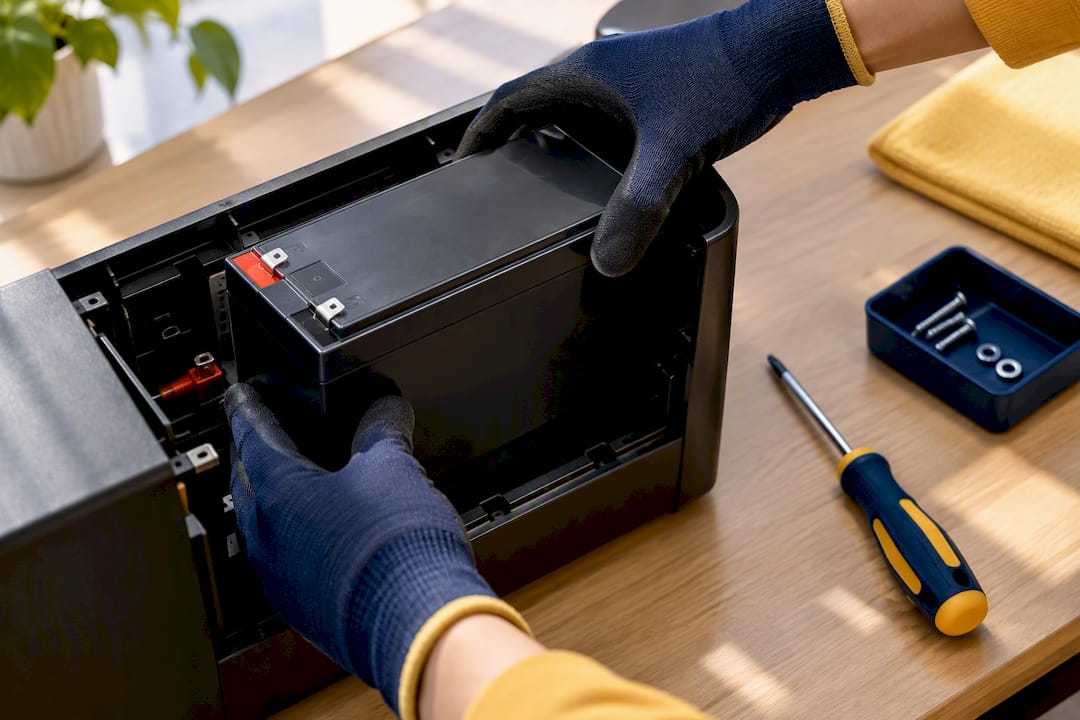
Battery replacement is the maintenance item most PC owners forget about. Lead-acid UPS batteries typically last three to five years depending on how often they cycle, and a safe replacement process matters both for your equipment and for handling the battery correctly. If your unit’s LCD or software starts flagging shorter runtime than it used to, that’s usually the battery aging out, not a sign the unit itself is failing.
How We Picked These UPS Models
Every model on this list earned its place through the same filter: does it solve a real, common PC power problem without asking the buyer to overpay or under-protect their system? That meant weighing waveform compatibility against Active PFC power supplies, checking VA and watt specs against what a typical gaming PC actually draws, and cross-referencing runtime claims against independent testing rather than manufacturer marketing copy alone.
- Waveform compatibility: does the unit’s on-battery output work safely with Active PFC power supplies, or only with older, simpler PSU designs?
- VA/watt accuracy: does the rated capacity match realistic usable watts, not just an inflated VA number?
- Measured runtime: how does the unit perform under moderate gaming loads in independent testing, not just idle-load lab conditions?
- Price-to-value fit: does the price make sense for the protection level, or does it oversell features a typical buyer won’t use?
- Fit for actual use cases: does the model match a specific, common setup (gaming rig, home network, small accessory) rather than trying to be everything to everyone?
This guide draws on manufacturer spec sheets, independent runtime testing from PC-focused outlets, and established explainers on UPS topology and Active PFC compatibility. It’s written and maintained as part of Atticus Goods’ broader hardware guidance library, with editorial oversight from Matthew Vista, who focuses on translating spec-sheet details into buying decisions PC owners can actually act on.
When Does a UPS Actually Earn Its Keep?
A UPS is cheap insurance until the moment it isn’t there, and that’s exactly when people notice. If you’re streaming, running a home server, or living somewhere with a genuinely unstable grid, the extra runtime of a 1500VA pure sine unit is worth the cost. If you’re protecting a desk lamp’s worth of networking gear, a $40 standby unit does the job just as well.
The trade-offs are real, though. Bigger units cost more, weigh more, and their batteries wear out on a clock whether you use them heavily or not. Battery packs degrade even sitting idle, so a UPS you buy today and rarely test will still need a battery swap in a few years regardless of how many outages it actually saw. Buy for the setup you have now, not the one you might build in five years.
— Matthew Vista
Where to Buy Your UPS and Accessories
Once you know the waveform and VA/watt rating your system needs, the next step is finding it in stock without waiting a week for shipping. A wide selection of consumer electronics and power management hardware, including UPS units and related accessories, is available for purchase with fast nationwide shipping on in-stock items.

Before you check out, it’s worth confirming two things on the product page: the watt rating (not just VA) and whether the unit outputs pure sine or simulated sine wave, especially if your PSU lists Active PFC. If you haven’t sized your system yet, Atticus Goods’ UPS sizing walkthrough breaks down measuring your real watt draw in about 20 minutes, and the gaming PC UPS buying guide covers model-specific fit for different rig sizes. Browse the full electronics and power management selection to compare in-stock options and get your order shipped without the wait.
Sources
- Uninterruptible Power Supply (UPS) setup and usage — UTRGV support
- The best uninterruptible power supplies (UPS) for PC — PC Gamer
- Best UPS for a gaming PC in 2026: pure sine wave, VA sizing — Crit & Craft
FAQ
Which UPS Should I Get for My PC?
For most gaming PCs, the CyberPower CP1500PFCLCD is the strongest overall choice thanks to its true sine-wave output and 1500VA capacity. If your PSU doesn’t list Active PFC and your setup is lighter, a smaller unit like the CyberPower LE1000DG or Amazon Basics Standby UPS 800VA covers basic protection at a lower cost.
How Long Will a 1000VA UPS Last?
Runtime depends heavily on what’s plugged in, but a 1000VA class unit typically offers a short to moderate runtime window under real gaming loads, enough to save open work and shut down cleanly rather than run for extended periods. It’s built for bridging brief outages, not powering through a long blackout.
How Long Will a 1500VA UPS Last?
A 1500VA unit generally runs roughly 10 to 25 minutes under typical gaming PC loads, depending on actual watt draw and how close you are to the unit’s rated capacity. Lighter loads stretch that runtime considerably; running near the unit’s ceiling shortens it.
Is a UPS Recommended for PC?
Yes, a UPS is recommended for modern PCs, especially systems with 80+ Gold or higher power supplies that use Active PFC. It protects against surges, brownouts, and sudden outages that can corrupt data or damage components without warning.