

For most homes, Reolink’s Argus PT Ultra is the best overall wireless security camera in 2026, thanks to its dual-lens wide coverage and local microSD storage with no subscription required. If you want zero monthly fees, Eufy’s local-storage lineup wins; if you’re on a tight budget, Wyze delivers real functionality for the least money. Nearly every camera on this list splits along one line: local storage you own outright, or cloud history you rent monthly, and that single choice affects your total cost more than the camera’s price tag ever will.
TL;DR:
- Most wireless cameras either require a monthly subscription for clip history or offer local storage, which significantly affects the total cost of ownership.
- Reolink Argus PT Ultra provides wide coverage, local microSD storage, and no mandatory subscription, making it ideal for outdoor and wide-area use.
- Eufy offers a solely local-storage approach with no recurring fees, while Wyze provides affordable options suitable for full-house coverage on a tight budget.
- For professional monitoring, ADT and SimpliSafe integrate cameras with alarm systems to provide human response for security events.
- Proper installation considerations, such as power source, Wi-Fi range, weatherproofing, and privacy, are crucial to ensure camera reliability and effectiveness.
Table of Contents
- Best Wireless Security Cameras 2026: A Quick Shortlist
- Comparing Power, Storage, and Subscription Costs Side by Side
- Detailed Profiles: What Each Camera Actually Gets You
- How to Choose the Right Wireless Camera for Your Home
- How These Picks Were Chosen
- Why Buy Your Camera Setup from Atticus Goods
- An Editor’s Take: What Real Installs Teach You That Spec Sheets Don’t
- Ready to Buy? Start With Power and Coverage
- Sources
- FAQ
Best Wireless Security Cameras 2026: A Quick Shortlist
Before you get lost comparing spec sheets, it helps to know which camera actually fits your situation. Here’s the shortlist, based on how each model performs once it’s actually mounted on a wall instead of sitting in a lab.
- Best overall: Reolink Argus PT Ultra. Wide dual-lens coverage, local storage baked in, and no forced subscription for basic clip playback. This is the pick if you want one camera to cover a driveway and a side yard without buying two units.
- Best no-subscription pick: Eufy. Eufy built its entire brand around local storage, and it shows. You pay once for the camera (and sometimes a base station), and clip history stays on your hardware indefinitely.
- Best budget pick: Wyze. Wyze cameras run cheap enough that outfitting an entire house costs less than one premium camera from Arlo or Nest. You give up some polish, but the core detection and live view work fine.
- Best for existing ecosystems: Ring (Amazon/Alexa households) or Nest (Google Home households). If you already have smart speakers or displays from either company, matching your camera brand to your hub cuts down on app-switching and voice command friction.
- Best for professional monitoring: ADT or SimpliSafe. These aren’t just cameras. They’re monitored systems where a human actually gets alerted if your camera trips an alarm at 3 a.m., which matters if you want more than a phone notification.
- Best for continuous recording: Lorex. Its PoE and NVR-based systems record around the clock rather than only on motion, which matters for driveways or businesses that need a complete timeline, not just triggered clips.
Price bands vary more by storage model than by brand reputation. A $40 Wyze camera and a $200 Arlo camera might both need a $3 to $10 monthly plan to unlock full clip history, according to Consumer Reports’ testing. Meanwhile, a $60 Eufy camera might need nothing at all, because the storage lives on a microSD card or local hub you already own.
One more distinction worth understanding before you shop: hub-based systems versus standalone cameras. SimpliSafe, ADT, and Abode generally route everything through a central base station or hub, which adds a setup step but often unlocks smarter automation, like tying camera motion to alarm arming. Standalone cameras from Wyze, Blink, or TP-Low Tapo work straight out of the box on your Wi-Fi network with no hub required, which is faster to set up but offers less system-level intelligence.
Pro Tip: If you’re mounting a camera more than 30 feet from your router, check the camera’s Wi-Fi range specs before you buy, not after. A camera that drops connection during a storm is worse than no camera at all.
Comparing Power, Storage, and Subscription Costs Side by Side
Every wireless camera forces a tradeoff between three things: how it gets power, whether it stores footage locally or in the cloud, and whether that footage costs you a monthly fee to actually retrieve. The table below lines up the shortlist entrants on exactly those axes.
| Camera | Best For | Power / Connectivity | Local Storage | Subscription for Clip History | Standout Feature | Typical Price Range |
|---|---|---|---|---|---|---|
| Wireless cameras | Fast shipping and accessory support | Varies by model | Varies by model | Varies by model | Online inventory with fast shipping options nationwide | Varies by product |
| Reolink | Wide-field, local-storage battery cameras | Battery / solar / Wi-Fi | Yes | No | Dual-lens wide coverage | $$ |
| Eufy | No recurring cloud fees | Battery / solar / Wi-Fi | Yes | No | Local storage, solar-enabled models | $$ |
| Wyze | Tight budgets, smart features | Battery or wired / Wi-Fi | Partial (some models) | Partial | Low upfront cost | $ |
| TP-Link Tapo | Value with local storage | Battery or wired / Wi-Fi | Yes | Partial | Strong value, local microSD support | $ |
| Blink | Long battery life on a budget | AA battery / Wi-Fi | Partial (Sync Module) | Partial | Very long battery runtime | $ |
| Arlo | Polished app, smart-home integration | Battery or wired / Wi-Fi | No | Yes | Color night vision | $$$ |
| Ring | Households in the Ring ecosystem | Battery or wired / Wi-Fi | No | Yes | Doorbell + camera ecosystem | $$ |
| Nest | Google Home integration | Wired or battery / Wi-Fi | No | Yes | Google Assistant integration | $$$ |
| SimpliSafe | Alarm-tied camera systems | Wired / battery / Wi-Fi | No | Yes | Active deterrence with alarm | $$ |
| ADT | Professional monitoring | Wired / battery / Wi-Fi | No | Yes | End-to-end monitored service | $$$ |
| Lorex | Continuous PoE/NVR recording | PoE / wired | Yes | No | Continuous local recording | $$$ |
| Aqara | Smart-home automation tie-ins | Battery or wired / Wi-Fi | Partial | Partial | Automation platform integration | $$ |
| Brinks Home | Monitored home security bundles | Wired / battery / Wi-Fi | No | Yes | Monitored security bundle | $$ |
| Abode | Flexible DIY or monitored setup | Hub-based / Wi-Fi | Partial | Partial | DIY-to-professional flexibility | $$ |
| Camcamp | Basic outdoor coverage on a budget | Battery / Wi-Fi | Partial | Partial | Simple, low-cost outdoor coverage | $ |
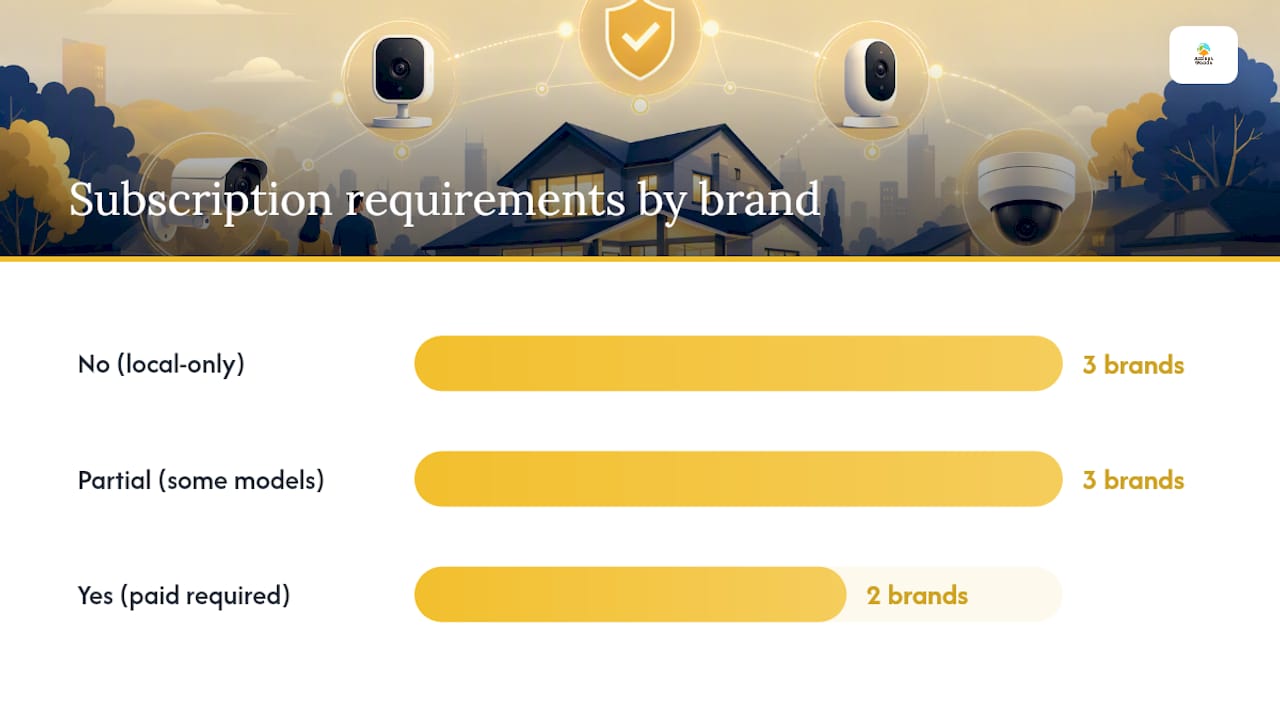
“Subscription required for clip history” means whether you need a monthly plan to view or store recorded footage beyond a live feed. “Yes” means the brand’s core clip-history feature is locked behind a paid tier. “No” means the camera stores clips locally (microSD, NVR, or hub) without a recurring fee. “Partial” means some models or feature tiers within that brand require a subscription while entry-level versions don’t, so you need to check the specific SKU you’re buying, not just the brand name.
Reolink and Eufy stand out here because they built local storage into their core product rather than treating it as an upsell. Lorex takes a different route entirely: its PoE and NVR systems record continuously to a local hard drive, which suits detached garages, driveways, or small businesses that want a full timeline rather than motion-triggered snippets.
Detailed Profiles: What Each Camera Actually Gets You
Atticus Goods: wireless camera picks with fast shipping
Atticus Goods carries a range of wireless camera and streaming camera options alongside the power accessories and mounting hardware that most buyers underestimate needing. The advantage isn’t a single hero product. It’s that you can order a camera, a power supply, and a compatible outdoor access point in one checkout with next-day shipping across the country. Pro: you avoid the multi-vendor shipping delays that turn a weekend install project into a two-week wait. Con: because inventory spans many brands rather than one house camera line, you’ll want to check each product page for the specific storage and subscription model before buying.
Reolink: the wide-coverage, no-subscription workhorse
Reolink’s dual-lens models like the Argus PT Ultra pair a wide field of view with a zoomable second lens, so one camera can watch a whole driveway and still get a close-up of a face at the gate. Power comes from battery or solar, and storage goes straight to a microSD card or an NVR without a forced monthly plan, a model CNET highlights specifically for no-subscription buyers. Pro: you own your footage outright. Con: the app is functional but less polished than Ring or Nest.
Eufy: local storage as the entire value proposition
Eufy’s pitch is simple: buy the camera, maybe buy a small home base, and never pay a cloud fee again. Solar-assisted models extend that further by cutting the battery-charging chore that annoys owners of every other battery camera on this list, a benefit Focused Insight’s 2026 buying guide also flags for sunny climates. Pro: predictable, one-time cost. Con: some advanced AI features (like package detection) still sit behind an optional subscription tier, so verify before assuming everything is free forever.
Wyze: the budget camera that still does the job
Wyze cameras often run $30 to $40 each, cheap enough to cover four entry points for less than one premium Arlo camera costs. Basic motion detection and live view work without a subscription; a paid Cam Plus tier adds smarter AI alerts and longer cloud clip storage. Pro: outfitting a whole house is genuinely affordable. Con: build quality and app polish trail the bigger brands, and Wi-Fi range can be shorter than pricier alternatives.
TP-Link Tapo: value with real local storage
Tapo cameras undercut Arlo and Nest on price while still offering microSD local storage on most models, which puts them a step ahead of Wyze on the ownership-cost question. Pro: strong value paired with actual storage flexibility. Con: the brand’s smart-home ecosystem is thinner than Ring’s or Google’s, so voice-assistant integration feels more basic.
Blink: long battery life, minimal fuss
Blink’s headline feature is battery runtime. Some models run on standard AA batteries for a year or more under normal use, and adding the optional Sync Module unlocks local USB storage with no subscription. Pro: you’re not charging batteries every few weeks. Con: without the Sync Module, clip history depends on a cloud plan, and detection zones are less flexible than Reolink’s.
Arlo: the polished pick that leans on subscriptions
Arlo cameras look and feel premium, with genuinely good color night vision and a clean app. But nearly all meaningful clip history and advanced AI detection sit behind an Arlo Secure subscription. Pro: best-in-class app experience and video quality. Con: the ongoing monthly cost adds up fast if you run more than one or two cameras.
Ring: the ecosystem play
Ring cameras make the most sense if you already own Echo speakers or an Alexa-based smart display, because the integration between doorbell, camera, and voice alerts is genuinely smooth. Pro: seamless doorbell-to-camera handoff and wide third-party device support. Con: like Arlo, most clip history requires a Ring Protect subscription, and local storage options remain limited.
Nest: Google’s answer, with the same subscription catch
Nest cameras integrate tightly with Google Home displays and Assistant voice commands, and the software experience is consistently rated among the smoothest in the category. Pro: excellent integration if you’re already Google-centric. Con: full clip history and intelligent alerts require a Nest Aware subscription, and pricing sits at the premium end.
SimpliSafe: cameras tied to a real alarm system
SimpliSafe treats the camera as one piece of a broader alarm system, so motion at a camera can trigger the same response as a door sensor tripping. Pro: active deterrence backed by an actual alarm, not just a notification. Con: you’re buying into a system, not just a camera, which raises the total investment.
ADT: full professional monitoring
ADT remains the choice for buyers who want a trained monitoring center dialing emergency services when something trips, not just a push notification you might miss. Pro: end-to-end professional monitoring with installation support. Con: this is the priciest tier on the list, with monthly monitoring fees layered on top of equipment costs.
Lorex: continuous recording for driveways and small businesses
Lorex’s PoE and NVR systems record continuously rather than only on motion events, storing everything to a local hard drive. Pro: a complete, unbroken timeline with no subscription. Con: PoE setups require running cable, which rules out purely wireless installs for some mounting spots.
Aqara: the automation-first option
Aqara cameras plug into a broader smart-home automation platform, so a camera detecting motion can trigger lights, locks, or thermostat changes. Pro: strong automation potential for existing smart-home users. Con: the camera-specific feature set is less mature than dedicated security brands.
Brinks Home: bundled monitored security
Brinks Home packages cameras into monitored security bundles similar in spirit to ADT and SimpliSafe. Pro: bundled monitoring simplifies buying a full system in one purchase. Con: as with other monitored options, the monthly fee is a permanent line item, not a one-time cost.
Abode: flexible DIY-to-monitored middle ground
Abode lets you start with self-monitoring and upgrade to professional monitoring later without swapping hardware. Pro: flexibility to change your mind after buying. Con: the hub-based approach adds setup complexity compared to fully standalone cameras.
Camcamp: basic, low-cost outdoor coverage
Camcamp offers straightforward outdoor battery cameras aimed at buyers who want simple coverage without extra features. Pro: low cost of entry. Con: the feature set is thin compared to Reolink or TP-Link Tapo at similar price points.
How to Choose the Right Wireless Camera for Your Home
Picking a winner from a roundup is easy. Picking the right camera for your actual front porch, detached garage, or upstairs hallway takes a bit more thought. Work through these steps in order, because each one narrows the field before you even start comparing brands.
- Match power type to the mounting spot first. A spot near an outlet should get a wired or PoE camera, full stop, since you eliminate battery charging entirely. A spot 40 feet from any outlet needs battery or solar power, and a sunny, south-facing wall makes solar genuinely worth the extra cost, a point Focused Insight’s guide also emphasizes for warm climates.
- Decide between local storage and cloud subscriptions before comparing prices. Local storage from brands like Eufy, Reolink, or Lorex means no monthly bill and footage that survives an internet outage, a resilience advantage Consumer Reports notes directly. Cloud storage from Ring, Arlo, or Nest means your footage lives off-site, safe from a stolen camera, but gone the moment you stop paying.
- Check your router before you check the camera. Many budget cameras only support 2.4GHz Wi-Fi, and a router running WPA3-only security can block pairing entirely on older camera firmware, according to Focused Insight’s 2026 guide. Enabling mixed WPA2/WPA3 mode, or setting up a separate 2.4GHz network name, solves most pairing headaches. If your router struggles to reach a detached garage, an outdoor access point closes that gap better than hoping a mesh extender reaches far enough.
- Set realistic expectations for battery wake latency and false alerts. Battery cameras take a beat to wake and start recording after motion triggers, and real-world battery life depends heavily on how many events fire, not just the lab spec sheet, a gap Android Central’s testing calls out directly. A busy urban porch drains a battery far faster than a quiet rural driveway.
- Confirm the IP rating before mounting anything outdoors. Look for IP66 or higher on any camera facing direct rain or snow; anything lower risks moisture damage within a season or two, per multiple lab-tested roundups.
- Think about placement for privacy, not just coverage. Point cameras at your own property lines, not directly into a neighbor’s window or shared walkway, and check your local rules on doorbell camera audio recording before enabling it by default.
Pro Tip: If you’re on a high-traffic porch and burning through battery faster than expected, narrow your camera’s activity zones and shorten clip length. Both settings cut unnecessary recording time without losing the motion events that actually matter.
Before you check out, ask yourself six quick questions: What’s my power source at this exact spot? Do I want to pay monthly, ever? Is my router’s Wi-Fi band compatible? How exposed is this camera to weather? Do I need one wide camera or two narrow ones? And who else has a legitimate reason to see this footage? Answering those honestly does more to narrow your choice than any spec sheet.
How These Picks Were Chosen
These recommendations draw on hands-on install patterns, published lab testing, and buying guides rather than marketing copy. Consumer Reports’ buying guide and its annual best-of roundup anchored claims about subscription gating and IP ratings, while CNET’s no-subscription roundup and Android Central’s local-storage testing informed the battery runtime and storage comparisons. Priority went to three metrics: real-world battery runtime under actual motion frequency, detection accuracy, and whether clip history requires a paid plan. This article contains no paid placements; Atticus Goods links point to its own storefront inventory.
Why Buy Your Camera Setup from Atticus Goods
Atticus Goods stocks more than 250,000 products, which matters here because a camera install rarely stops at the camera. You typically need mounting hardware, a stable power source, and sometimes better Wi-Fi coverage before the system actually works reliably.
- Camera and streaming gear like the Logitech Mevo Core sit alongside networking and power accessories in the same catalog.
- Next-day nationwide shipping on in-stock items means a forgotten power adapter doesn’t stall your whole install for a week.
- Accessory support, including outdoor access points and auxiliary power supplies, lets you fix Wi-Fi dead zones and power gaps in one order.
- Customer reviews and posted deals help you compare real buyer feedback before committing to a specific model.
An Editor’s Take: What Real Installs Teach You That Spec Sheets Don’t
Most buying advice treats subscriptions as a footnote. It shouldn’t be. A $60 camera that costs $10 a month adds up to more than a $200 camera with no plan within two years, and almost nobody does that math before checking out. The other pattern worth watching: field reports consistently point to power mismatch, not camera quality, as the top cause of buyer regret. Someone mounts a battery camera 50 feet from an outlet, hates recharging it every three weeks, and blames the brand instead of the placement choice. Get the power type right for the actual mounting spot first. Everything else on the spec sheet matters less than that one decision.
For guidance on installation basics like mounting angles and cable routing, Stivo’s installation walkthrough covers the practical steps most buyers skip past.
— Matthew Vista
Ready to Buy? Start With Power and Coverage
Once you’ve picked a camera, the parts that actually make it work reliably rarely come in the box. Atticus Goods stocks the power accessories and Wi-Fi hardware that turn a camera that sort of works into one that never drops a connection or dies mid-charge, with next-day shipping so you’re not waiting a week to finish a weekend project.

If you’re setting up a wired or PoE camera, the Netgear ProSAFE auxiliary power supply keeps your system running even through a brief outage, and the Netgear power module for RPS4000 adds redundant power for multi-camera NVR setups. Solar accessories like Reolink-compatible solar panels cut down on battery swaps for outdoor mounts in sunny spots. Browse the full Atticus Goods storefront for camera-compatible accessories, and check out today before your next-day shipping window closes.
Sources
- Home security camera buying guide — Consumer Reports
- Best home security cameras without subscriptions — CNET
- Best security cameras with local storage — Android Central
FAQ
What is the best wireless outdoor security camera for 2026?
The Reolink Argus PT Ultra leads the pack for most outdoor mounting spots, thanks to its dual-lens wide coverage, local microSD storage, and no forced subscription for basic clip playback.
What is the top-rated wireless security camera overall?
There’s no single “top-rated” model across every category. Reolink rates highest for no-subscription, wide-coverage use, Eufy for total ownership cost, and ADT for professionally monitored systems.
Which wireless security camera system is best for someone who doesn’t want a monthly fee?
Eufy and Reolink both lead here, since their core storage model relies on local microSD cards or hubs rather than cloud subscriptions, matching what CNET’s no-subscription roundup recommends for budget-conscious buyers.
Do I need a subscription for every wireless security camera?
No. Brands like Reolink, Eufy, and Lorex support local storage without a required plan, while Ring, Nest, and Arlo generally gate full clip history behind a monthly subscription.
What should I check before buying a wireless security camera in 2026?
Confirm the power type fits your mounting spot, check whether clip history requires a subscription, and verify the IP rating is at least IP66 for any camera facing direct weather exposure.