

Ethernet is a wired local area network technology that connects devices using physical cables, while Wi-Fi is a wireless networking standard that transmits data over radio frequencies without any cables. Understanding what is ethernet vs wi-fi matters the moment you start asking why your video call drops, your file transfers crawl, or your gaming session lags. Both technologies connect your devices to the internet and to each other, but they do it in fundamentally different ways, with real consequences for speed, reliability, and security. Choosing between them, or combining them, is one of the highest-impact decisions you can make for a home or small business network.
What are the technical differences between Ethernet and Wi-Fi?
Ethernet and Wi-Fi are governed by separate IEEE standards that define how data moves across each medium. Ethernet operates under IEEE 802.3, while Wi-Fi is defined by IEEE 802.11. Those two numbers represent decades of separate engineering decisions, and they explain why the two technologies behave so differently in practice.
The physical layer is the most obvious difference. Ethernet runs data through copper or fiber cables. Cable standards range from Cat5e, which tops out at 100 Mbps, all the way to Cat8, which supports 40 Gbps. Wi-Fi, by contrast, broadcasts data as radio waves across shared airspace. That shared airspace is the source of most Wi-Fi problems.

At the data link layer, the two technologies use different collision avoidance strategies. Ethernet uses CSMA/CD (Carrier Sense Multiple Access with Collision Detection), which detects and resolves data collisions on the wire. Wi-Fi uses CSMA/CA (Carrier Sense Multiple Access with Collision Avoidance), which tries to prevent collisions before they happen because detecting them wirelessly is impractical. Collision avoidance adds overhead that collision detection does not, which is one reason Wi-Fi latency runs higher than Ethernet even when signal strength looks perfect.
Here is a side-by-side look at the core technical differences:
| Feature | Ethernet | Wi-Fi |
|---|---|---|
| Standard | IEEE 802.3 | IEEE 802.11 |
| Medium | Copper or fiber cable | Radio waves |
| Collision handling | CSMA/CD | CSMA/CA |
| Max cable/range speed | Up to 40 Gbps (Cat8) | Up to 1+ Gbps (Wi-Fi 6E/7) |
| Interference susceptibility | None | High (walls, devices, neighbors) |
Key technical points to keep in mind:
- Ethernet cables create a dedicated, point-to-point link. No other device shares your signal.
- Wi-Fi channels are shared among all nearby devices, including your neighbors’ networks.
- Fiber Ethernet eliminates electromagnetic interference entirely, which copper cables can still experience near power lines or industrial equipment.
- Wi-Fi 6 introduced OFDMA and BSS coloring to reduce channel contention, but these features improve the situation rather than eliminate it.
Pro Tip: If you are running Cat5e in an older home or office, upgrading to Cat6 cables costs very little and doubles your headroom to 1 Gbps, which future-proofs the wired side of your network without replacing any hardware.
How do Ethernet and Wi-Fi compare in speed, latency, and reliability?
Speed is the number most people focus on, but it is the least important metric for everyday network satisfaction. Latency and consistency matter far more for real-world use.
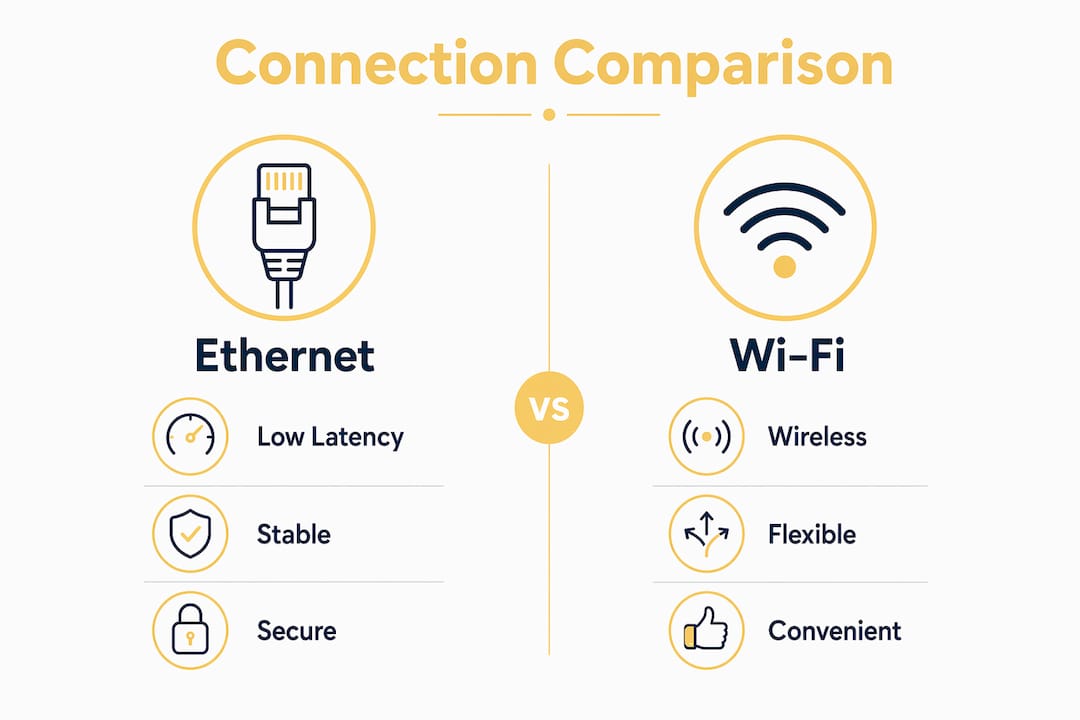
Ethernet latency sits at 0.1 to 0.5 ms on a local network. Wi-Fi latency ranges from 2 to 15 ms or higher depending on interference and how many devices are competing for airtime. That gap sounds small in absolute terms, but it compounds. A video call, a cloud file sync, and a streaming device all running simultaneously on Wi-Fi each add their own latency contributions. On Ethernet, those devices operate on dedicated links and do not interfere with each other at all.
On raw speed, the gap has narrowed significantly. Wi-Fi 6E devices can push past 1 Gbps for a single client on a clean channel close to the router. Wi-Fi 7 pushes that further. Standard Gigabit Ethernet delivers 1 Gbps consistently, regardless of distance within cable limits, neighboring networks, or how many microwave ovens are running in the break room. The key word is consistently. Wi-Fi speeds drop with distance and interference, while Ethernet maintains its rated speed from the first meter to the last.
Reliability is where Ethernet wins without argument. Ethernet provides a stable, interference-free connection because the physical cable is a dedicated link. Wi-Fi shares the radio spectrum with Bluetooth devices, baby monitors, neighboring routers, and even cordless phones. Wi-Fi 6’s OFDMA and BSS coloring reduce that interference but cannot remove the variability that is inherent to wireless communication.
For practical context: Netflix 4K streaming requires a minimum of 25 Mbps per stream. Both Ethernet and Wi-Fi can deliver that number easily in ideal conditions. The difference appears when three people are streaming simultaneously, someone is on a video call, and a backup is running in the background. Ethernet handles that scenario without a hiccup. Wi-Fi may buffer, stutter, or drop quality.
The bottom line on performance:
- Ethernet wins on latency, consistency, and reliability in all environments.
- Wi-Fi 6/6E/7 can match Ethernet on peak speed in ideal conditions, but ideal conditions rarely describe a real home or office.
- Users often perceive Wi-Fi as slower not because of raw bandwidth but because of latency variability and retransmissions that Ethernet eliminates entirely.
- Dense environments like apartment buildings or open-plan offices amplify every Wi-Fi weakness.
What are the practical advantages and disadvantages of each?
Understanding the advantages of Ethernet over Wi-Fi requires looking beyond the spec sheet and into how each technology behaves in a real building with real devices.
Ethernet advantages:
- Consistent speeds that do not vary with distance, walls, or neighboring networks.
- Near-zero latency, which is critical for gaming, VoIP calls, and media servers.
- Physical security. An attacker must plug into your cable to intercept traffic. There is no wireless signal to intercept from the parking lot.
- No shared airtime. Every wired device gets its own dedicated link to the switch or router.
- Works reliably in environments with heavy wireless congestion, such as apartment buildings or trade show floors.
Ethernet disadvantages:
- Cables require physical installation, which can mean drilling through walls or running conduit.
- Devices must stay in one place. A desktop or NAS server works fine on Ethernet; a phone you carry room to room does not.
- Cable clutter is real. A home office with five wired devices can look like a data center if you are not careful with cable management.
Wi-Fi advantages:
- Mobility. Your phone, tablet, and laptop connect from anywhere in the building.
- Setup takes minutes. Plug in a router and every wireless device in range can connect.
- Modern Wi-Fi 6 and Wi-Fi 7 routers like the Netgear Nighthawk RS500 deliver fast, whole-home coverage without a single cable run.
- Guest networks are easy to create and isolate from your main network.
Wi-Fi disadvantages:
- Signal degrades through walls, floors, and interference sources.
- Shared spectrum means your speed depends partly on what your neighbors are doing.
- Wireless networks are a larger attack surface than wired ones, requiring strong encryption (WPA3) and regular password updates.
Pro Tip: For small business owners, the security argument alone often justifies running Ethernet to any device that handles financial transactions, customer data, or sensitive file storage. A wired connection simply cannot be intercepted from outside the building.
When should you use Ethernet vs Wi-Fi in your network?
Choosing between Ethernet and Wi-Fi based on device role is the most practical framework available. Not every device needs a cable, and not every device can function well without one.
Use Ethernet for:
- Desktop computers and workstations that never move.
- Network-attached storage (NAS) devices and local servers.
- Gaming consoles and gaming PCs where latency directly affects performance.
- Smart TVs and streaming boxes running 4K content.
- IP cameras and security systems that need constant, reliable uptime.
- VoIP phones and video conferencing systems in a business setting.
Use Wi-Fi for:
- Smartphones, tablets, and laptops that move between rooms or locations.
- Smart home devices like thermostats, lights, and speakers.
- Guest devices that need temporary internet access.
- Any device in a location where running a cable is impractical.
The strongest network design for both homes and small businesses is a hybrid wired backbone with wireless access for mobile clients. In practice, this means your router connects to a managed Ethernet switch, which distributes wired connections to stationary devices. A Wi-Fi access point, such as the Netgear WAX610Y Wi-Fi 6, connects to that same switch and handles all wireless clients. This design keeps your high-demand devices on the stable wired network while giving mobile devices full wireless coverage.
Environmental factors matter too. A single-story home with an open floor plan loses very little Wi-Fi signal across the space. A two-story brick building with thick interior walls is a different situation entirely. In that environment, running Ethernet to each floor and placing a wireless access point per floor produces far better results than relying on a single router to punch through the structure.
For latency-sensitive applications like gaming or media servers, Ethernet removes wireless renegotiations and retransmissions that cause jitter. That is not a marginal improvement. It is the difference between a smooth experience and one that frustrates you every time it matters most.
Key takeaways
Ethernet delivers consistent, low-latency performance that Wi-Fi cannot match in congested or interference-heavy environments, making a hybrid network the optimal design for most homes and small businesses.
| Point | Details |
|---|---|
| Ethernet wins on latency | Wired connections deliver 0.1 to 0.5 ms latency versus 2 to 15 ms or more for Wi-Fi. |
| Wi-Fi wins on mobility | Wireless is the only practical choice for smartphones, tablets, and laptops that move. |
| Hybrid networks perform best | Wire your stationary devices and use Wi-Fi access points for mobile clients. |
| Cable grade matters | Cat5e supports 100 Mbps; Cat6 and above support 1 Gbps or more for future-proofing. |
| Wi-Fi 6/7 narrows the speed gap | Peak wireless speeds now rival Gigabit Ethernet, but consistency still favors the cable. |
The case for wiring what matters most
I have set up networks in everything from single-room home offices to multi-floor retail spaces, and the pattern is always the same. People tolerate Wi-Fi problems on their phones without complaint, but the moment a video call drops or a point-of-sale system freezes, they want answers fast. Every single time, the root cause is a device that should have been wired and was not.
The conversation around Wi-Fi 6 and Wi-Fi 7 has made people overly confident in wireless performance. Yes, peak speeds are impressive on a clean channel close to the router. But real buildings are not clean channels. They are full of competing signals, thick walls, and devices that were never designed to share spectrum gracefully. Ethernet does not care about any of that.
My honest recommendation: wire every device that sits still. Your desktop, your NAS, your smart TV, your gaming console, your office workstations. Run those cables once and forget about them. Then use a quality Wi-Fi 6 access point for everything that moves. You will spend less time troubleshooting and more time actually using your network. The hybrid approach is not a compromise. It is the right answer for almost every home and small business I have ever seen.
— James
Upgrade your network with the right hardware
Building a reliable network starts with the right equipment, and Atticusgoods carries the hardware to wire your stationary devices and blanket your space with fast wireless coverage.
For the wired side, the Netgear GS348 Ethernet switch gives you 48 ports of Gigabit connectivity, making it a strong fit for small business environments or homes with multiple wired devices. Pair it with a Wi-Fi 6 or Wi-Fi 7 access point for mobile coverage, and you have a hybrid network that handles both performance and convenience. Browse the full selection of networking gear at Atticusgoods for trusted brands, competitive pricing, and next-day shipping across the United States.
FAQ
What is the main difference between Ethernet and Wi-Fi?
Ethernet uses physical cables to create a dedicated, wired connection between a device and a network, while Wi-Fi transmits data over radio waves without cables. Ethernet delivers lower latency and more consistent speeds; Wi-Fi provides mobility and easier setup.
Is Ethernet faster than Wi-Fi in 2026?
Standard Gigabit Ethernet delivers 1 Gbps consistently, and Wi-Fi 6E and Wi-Fi 7 can match or exceed that on peak speed close to the router. The practical difference is consistency: Ethernet holds its speed regardless of interference, while Wi-Fi speeds vary with distance, obstacles, and network congestion.
Should I use Ethernet or Wi-Fi for gaming?
Ethernet is the better choice for gaming because it delivers latency as low as 0.1 ms compared to 2 to 15 ms or more on Wi-Fi. Lower, more stable latency reduces jitter and eliminates the wireless retransmissions that cause lag spikes during competitive play.
Can I use both Ethernet and Wi-Fi at the same time?
Yes, and a hybrid setup is the recommended approach for most homes and small businesses. Wire stationary, high-demand devices like desktops, consoles, and servers via Ethernet, and use Wi-Fi for mobile devices like phones, tablets, and laptops.
Is Wi-Fi less secure than Ethernet?
Ethernet is more secure because data travels over a physical cable that requires direct access to intercept. Wi-Fi broadcasts a signal that can be accessed by anyone within range, making strong encryption like WPA3 and regular password management necessary for any wireless network.