

Stacking discount codes for electronics is the practice of layering multiple savings methods simultaneously on a single purchase, combining store sales, coupon codes, cash back portals, and manufacturer rebates to pay significantly less than the listed price. Most shoppers apply one discount and stop there. The ones who consistently get the best electronics discounts apply four or five layers at once. This guide covers the tools you need, the exact steps to execute a stack, the mistakes that kill your savings, and how to time purchases for maximum payoff.
What tools do you need to stack discount codes on electronics?
The foundation of any successful stack is Rakuten, a cash back portal that partners with 3,500+ stores and pays you a percentage back on purchases made through its shopping path. Cash Back payouts arrive every three months via check, PayPal, or points. That means Rakuten is not an instant discount at checkout. It is a separate layer that runs in parallel with everything else.
The Rakuten browser extension is the most practical tool for everyday shoppers. It activates automatically when you land on a partner retailer’s page, alerts you to available Cash Back rates, and can apply coupon codes at checkout. Automating Cash Back activation this way removes the single biggest cause of missed savings: forgetting to start your session through the portal.

Beyond Rakuten, you need three more inputs before you shop. First, check the manufacturer’s website directly. Brands like LG, Samsung, and Netgear regularly post rebate offers that apply after purchase. Second, sign up for the retailer’s email newsletter to receive store-specific coupon codes. Third, use a rewards credit card that earns points or a percentage back on electronics purchases. Each of these is a separate layer.
| Tool or platform | Role in stacking | Timing |
|---|---|---|
| Rakuten portal or extension | Earns Cash Back on qualifying purchases | Post-purchase, paid quarterly |
| Store coupon codes | Reduces checkout price directly | Instant at checkout |
| Manufacturer rebates (LG, Samsung) | Returns cash after purchase submission | Post-purchase, weeks to months |
| Rewards credit card | Earns points or percentage back on spend | Post-purchase, per billing cycle |
| Retailer newsletter coupons | Provides exclusive promo codes | Instant at checkout |
Pro Tip: Install the Rakuten browser extension before you start any electronics shopping session. It takes 60 seconds and prevents the most common stacking failure: shopping outside the cash back path.
How to stack multiple coupon codes on an electronics purchase
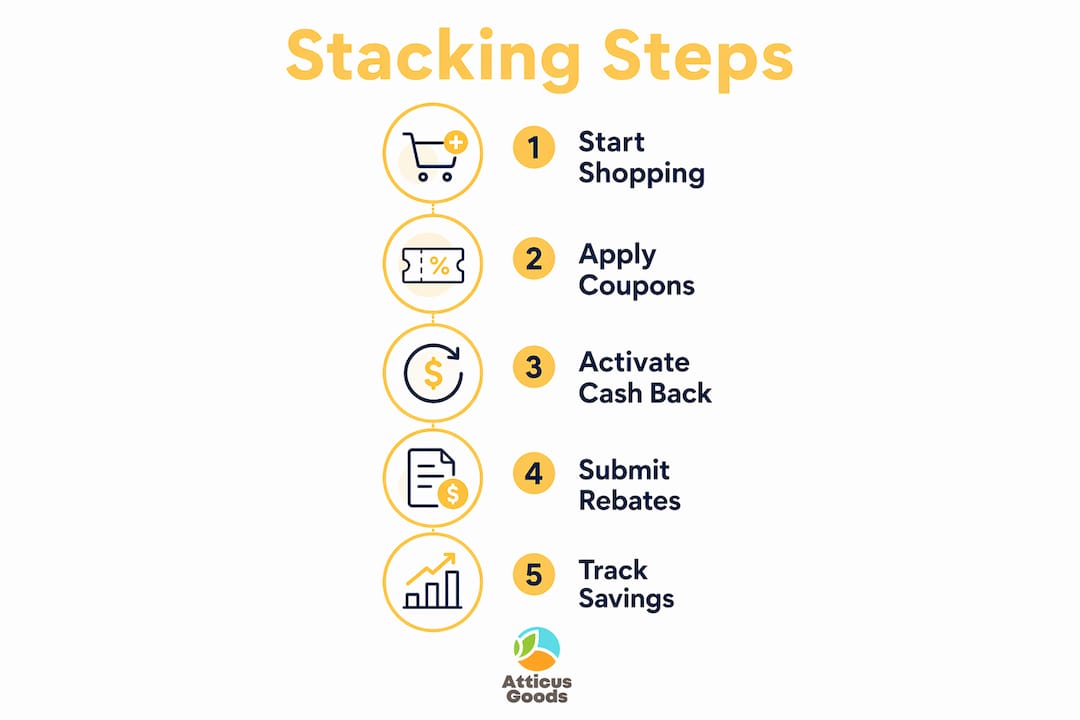
Stacking works in a specific order, and getting that order wrong costs you money. Think of savings in layers with different timing: instant checkout discounts come first, then tracking-based cash back, then post-purchase rebate submissions. Each layer is independent, and losing one does not cancel the others.
Here is the exact sequence to follow:
- Find your product and confirm the rebate. Before you add anything to a cart, visit the manufacturer’s website or the retailer’s rebate page to confirm an active rebate offer exists for that product. Note the submission deadline and required documents.
- Collect your coupon codes. Check the retailer’s newsletter, the store’s coupon page, and any discount code aggregator sites for active electronics promo codes. Write them down. You will test them at checkout.
- Open your session through Rakuten. Go to Rakuten.com or click the browser extension, then navigate to the retailer from there. This step locks in your Cash Back tracking. Skipping it means you earn nothing from Rakuten, regardless of what else you do.
- Add the product to your cart and apply coupon codes. Enter your best coupon code first. Most retailers allow only one promo code per order, so test the highest-value code first. If the retailer allows stacking multiple codes, apply them in descending order of value.
- Confirm the sale price is applied. Many retailers run automatic sale prices that appear in the cart. Verify the sale price is active before you enter any codes, because some codes only work on full-price items.
- Pay with your rewards credit card. This adds the final instant layer. A card earning 2% back on electronics adds real money on a $500 purchase.
- Submit your manufacturer rebate promptly. After delivery, gather your receipt, UPC barcode, and any required forms. Submit all required documents promptly and keep copies until the rebate check or credit arrives.
The biggest misconception about this process is treating all discounts as equivalent. Cash Back is an additional layer, not a replacement for coupons or store sales. You do not have to choose between them. You use them together.
Pro Tip: Screenshot your Rakuten Cash Back confirmation page immediately after checkout. If tracking fails, that screenshot is your evidence when filing a missing Cash Back claim.
Common mistakes that kill your electronics discount stack
The most expensive mistake is starting your shopping session outside the Rakuten portal. If you navigate directly to a retailer’s website without clicking through Rakuten first, your purchase does not qualify for Cash Back. Correct tracking of your shopping path is the foundational step that controls whether stacking works at all.
The second most common error is using an incompatible coupon code. Using incompatible savings offers can void the Rakuten Cash Back layer entirely. Some third-party coupon codes are flagged as incompatible with cash back programs. Always verify that a coupon code is listed as compatible on the Rakuten portal before applying it at checkout.
Here are the mistakes that cost shoppers the most money:
- Skipping the Rakuten session start. Shopping directly on a retailer’s site without clicking through the portal loses the entire Cash Back layer.
- Using unverified coupon codes. Random codes from non-partner sites can void cash back eligibility.
- Missing the rebate submission window. Manufacturer rebates from brands like LG and Samsung have strict deadlines. Missing the window means losing that layer entirely.
- Discarding purchase documentation. Rebate submissions require receipts, UPC codes, and sometimes original packaging. Throwing these away before the rebate arrives is a permanent loss.
- Assuming all discounts stack automatically. Some retailer sales explicitly exclude additional coupon codes. Read the terms before applying a code.
| Discount type | Timing | Common failure point |
|---|---|---|
| Store sale price | Instant at checkout | Coupon code overrides or excludes it |
| Coupon or promo code | Instant at checkout | Incompatible with cash back portal |
| Rakuten Cash Back | Quarterly payout | Wrong shopping path, incompatible code |
| Manufacturer rebate | Weeks to months post-purchase | Missed deadline, lost documentation |
| Credit card rewards | Per billing cycle | Wrong card used, category exclusion |
The rebate timing issue deserves extra attention. Manufacturer rebates require post-purchase submission and documentation. They are not instant discounts. Shoppers who treat them as automatic savings consistently miss the submission step and lose that layer.
When should you time electronics purchases to maximize stacking?
Timing is the multiplier that separates average stacking from exceptional savings. Rakuten runs periodic promotional windows where Cash Back rates rise sharply above normal levels. The Rakuten Big Stack Event in june 2026 ran june 22–26 and offered at least 10% Cash Back at participating stores, with some retailers reaching 97% Cash Back. That event was designed specifically to stack on top of existing store sales, coupon codes, and credit card rewards.
Buying during an elevated Cash Back window does not change how you execute the stack. You follow the same steps. The difference is that the Rakuten layer is worth substantially more than on an ordinary day. A purchase that earns 3% Cash Back on a regular Tuesday might earn 15% or more during a Big Stack Event. On a $600 laptop, that difference is meaningful.
Purchasing during high Cash Back windows multiplies stacking benefits substantially compared to ordinary days. The practical implication is that non-urgent electronics purchases are worth delaying until a promotional event is active. Check the Rakuten blog and your email notifications for event announcements.
Pro Tip: Set a Rakuten email alert and check the portal’s “Elevated Cash Back” page weekly. When a Big Stack Event is announced, cross-reference it with any active manufacturer rebates on products you already planned to buy. That combination is the highest-value stack available.
The one risk with timing is overwaiting. If a product is on sale now with a strong coupon code and an active rebate, a good stack today beats a theoretically perfect stack that never happens. Evaluate the current stack value against the expected event value and decide accordingly.
Key Takeaways
Stacking discount codes on electronics requires layering instant checkout discounts, tracking-based cash back through Rakuten, and post-purchase manufacturer rebates in the correct sequence to realize the full savings potential.
| Point | Details |
|---|---|
| Start every session through Rakuten | Navigate to any retailer from the Rakuten portal or extension to lock in Cash Back tracking. |
| Layer discounts, don’t choose between them | Cash Back supplements coupons and sales; apply all compatible layers simultaneously. |
| Submit rebates immediately after delivery | Gather receipts and UPC codes right away and keep copies until the rebate arrives. |
| Time big purchases around stacking events | Rakuten’s Big Stack Event and similar windows can multiply Cash Back rates dramatically. |
| Verify coupon compatibility before checkout | Incompatible promo codes can void Cash Back eligibility and eliminate an entire savings layer. |
The part most shoppers skip entirely
The rebate step is where I see the most money left on the table. Shoppers execute a solid stack at checkout, feel good about the savings, and then never submit the manufacturer rebate. That rebate is often the largest single layer in the stack, sometimes exceeding the coupon and cash back combined on products from brands like LG and Samsung.
The fix is organizational, not technical. I keep a simple spreadsheet with one row per rebate: product name, purchase date, submission deadline, required documents, and submission confirmation number. It takes two minutes to set up per purchase. That habit has recovered savings that would otherwise have expired unsubmitted.
The second thing I tell anyone starting with stacking is to automate what you can and manually track what you cannot. The Rakuten browser extension handles the cash back activation automatically. Coupon codes are fast to apply. The rebate is the only step that requires sustained attention over weeks. Treat it like a bill you have to pay, because missing it costs you real money.
One more thing: do not try to build a perfect six-layer stack on your first purchase. Start with Rakuten plus one coupon code. Get comfortable with the session-start habit. Add the rebate layer on your next purchase. Add the credit card layer after that. Overcomplicating the process on day one leads to errors that void the layers you already had working.
— Matthew Vista
Electronics deals worth stacking at Atticus Goods
Atticus Goods carries over 35,000 in-stock electronics products, from Logitech conference equipment to Netgear networking hardware, with next-day shipping across the United States. The stacking strategies covered in this article apply directly to purchases made there.

Start your next electronics purchase by opening your Rakuten session, then browse the full electronics catalog at Atticus Goods for products from brands like Logitech and Netgear. If you are looking for a specific product to test your stack on, the Logitech Rally Board 65 is a high-value item where layering a coupon code, Rakuten Cash Back, and a rewards card makes a measurable difference on the final price.
FAQ
What does it mean to stack discount codes on electronics?
Stacking means applying multiple savings methods to a single electronics purchase at the same time, such as a store sale price, a coupon code, Rakuten Cash Back, and a manufacturer rebate. Each layer reduces your total cost independently.
Can you use Rakuten Cash Back with coupon codes?
Yes. Cash Back is an additional layer that works alongside coupons and store sales, not instead of them. The key is verifying that your coupon code is compatible with the cash back portal before applying it.
How do manufacturer rebates work in a discount stack?
Manufacturer rebates from brands like LG and Samsung are post-purchase incentives. You pay at checkout and then submit required documents, such as your receipt and UPC code, to receive a cash payment weeks or months later. They are not instant discounts.
What is Rakuten’s Big Stack Event?
Rakuten’s Big Stack Event is a limited promotional window where Cash Back rates rise significantly above normal levels. The june 2026 event offered at least 10% Cash Back at participating stores, with some retailers reaching 97%, designed to stack on top of existing sales and coupons.
What is the most common reason a discount stack fails?
The most common failure is shopping directly on a retailer’s website without starting the session through the Rakuten portal. Correct tracking of your shopping path is the step that determines whether Cash Back is earned at all.