

The best video doorbell for most homes in 2026 is a battery or wired model with local storage, a 150° or wider field of view, and support for at least one major smart home ecosystem. If you want zero subscriptions, look at Eufy, TP-Link, or Reolink models with onboard storage. If you already run Alexa or Google Home, buy inside that ecosystem for tighter automation. Shop online for consumer electronics and smart home gear with fast shipping and easy returns.
TL;DR:
- Local storage options like microSD cards or hub-based solutions offer comparable nighttime video quality and response times as subscription plans, saving costs over time.
- Power over Ethernet (PoE) doorbells provide the most reliable, continuous recording, but require specialized network hardware and usually cost between $150 and $300.
- Cameras with at least 150 degrees of field of view improve porch coverage, especially in narrow or recessed entries, more than higher resolutions alone.
- On-device AI detection for persons, packages, and vehicles responds faster and reduces false alerts, making it a key feature to prioritize over cloud-dependent detection.
- Compatibility checks are crucial before purchasing; verify existing wiring voltage, app-supported smart home platforms, local storage inclusion, and mounting options to avoid returns.
Table of Contents
- Best Video Doorbells 2026: Quick Picks by Use Case
- How Do You Choose the Right Video Doorbell?
- Subscription vs. Local Storage: Which Should You Choose?
- Installation and Compatibility Checklist
- Privacy and Security Checklist After Installation
- How We Picked These Video Doorbells
- What Actually Matters for Smart Doorbell Buyers in 2026
- Where to Buy Your Video Doorbell
- Sources
- FAQ
Best Video Doorbells 2026: Quick Picks by Use Case
You don’t need to read every spec sheet to make a good call here. Match your priority (no subscription, tightest budget, best ecosystem fit, or wired reliability) to one of these categories, then verify the specific model’s compatibility with your existing chime or app before you buy.
- Best overall for most homes: A battery or wired doorbell with 2K resolution, a 150 to 160 degree field of view, and person/package detection built into the device itself rather than the cloud. Expect to pay typical prices aligned with mid-range hardware in this tier.
- Best subscription-free pick: Models with microSD or hub-based local storage, since Consumer Reports’ lab testing singles out Eufy, TP-Link, Wyze, and Reolink for strong nighttime video and fast response times without a monthly fee. Typical price range falls within an affordable mid-range bracket.
- Best budget option: Entry-level battery doorbells with 1080p to 2K resolution and app-based motion alerts, usually under $100. You give up some detection accuracy and field of view at this price, but basic monitoring works fine.
- Best for Apple HomeKit households: A shrinking but real category. Fewer doorbells support HomeKit Secure Video natively, so check the box or listing for explicit HomeKit compatibility before ordering, not just “works with Apple.”
- Best wired or PoE pick: Power over Ethernet doorbells skip battery charging entirely and tend to deliver more consistent video streaming, which matters if you record continuously rather than only on motion. Expect $150 to $300, plus a PoE injector or switch if your network doesn’t already supply it.
- Best for tight porches or narrow entryways: A model with a dual-camera design or a wide-angle lens rated above 160 degrees. Narrow coverage is the single most common complaint in doorbell reviews.
Before you commit to any pick, confirm three things on the product page: existing chime wiring voltage if you’re going wired, exact app-supported smart home platforms (not just “smart home compatible” as a blanket claim), and whether local storage is included in the box or sold as an add-on hub.
How Do You Choose the Right Video Doorbell?
The decision tree is shorter than most marketing pages make it look. Power source narrows your options first, video quality and detection narrow them further, and smart home compatibility usually makes the final call.
Wired vs. battery vs. PoE: what installation actually looks like
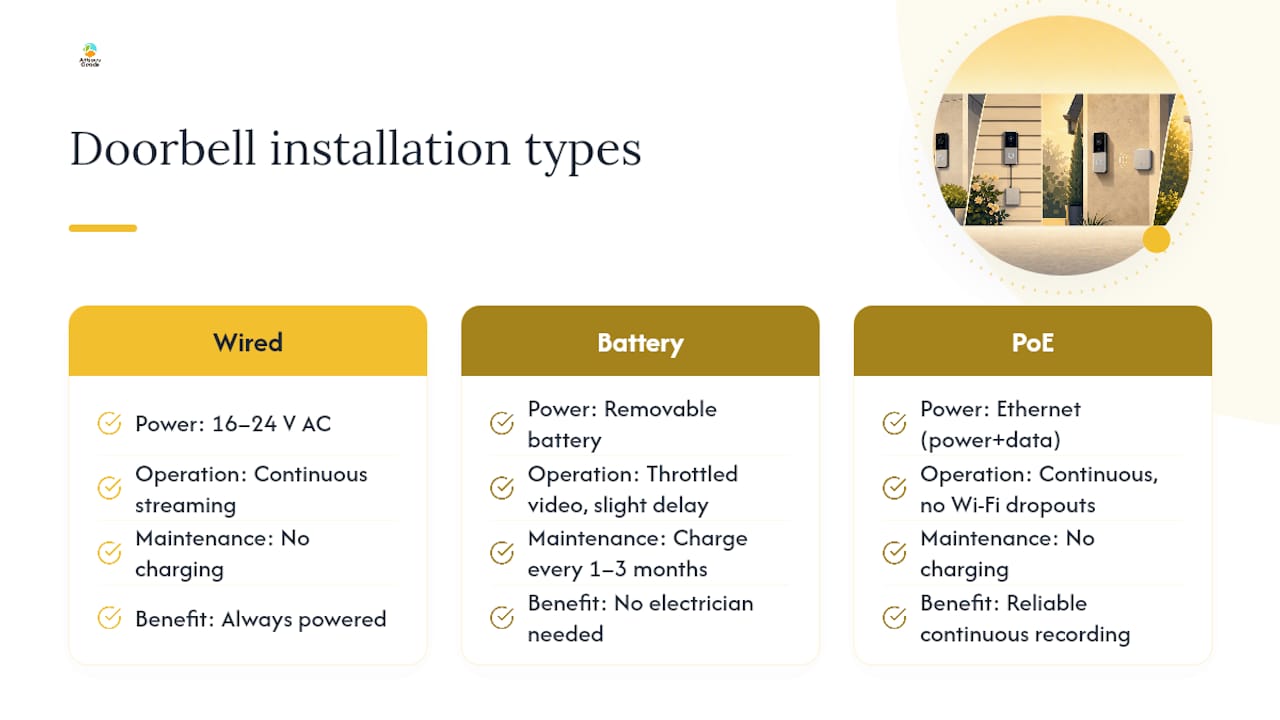
Wired doorbells tap into your existing doorbell transformer, which typically runs 16 to 24 volts AC. That’s enough to keep the camera powered and streaming around the clock without you thinking about it again. The catch: older homes sometimes have transformers rated below what a video doorbell needs, especially anything under 16V, which causes intermittent rebooting or a dim indicator light. Check your transformer rating before buying a wired-only model.
Battery doorbells solve the wiring problem entirely. You mount them, charge the removable battery every one to three months depending on activity, and skip the electrician. The trade-off is that battery units often throttle video quality or delay live view slightly to conserve power, and heavy foot traffic areas will drain a battery faster than most spec sheets imply.
PoE (Power over Ethernet) doorbells are the least common but arguably the most reliable for anyone who wants continuous recording rather than motion-triggered clips. A single Ethernet cable delivers both power and data, which eliminates Wi-Fi dropouts entirely. You’ll need a PoE switch or injector if your router doesn’t supply PoE natively. A power supply accessory becomes relevant here if your existing network gear doesn’t already handle it.
Video resolution, HDR, and field of view
Resolution alone doesn’t tell you much. A 2K doorbell with poor HDR handling will wash out a face standing in front of bright morning sun, while a well-tuned 1080p camera with strong HDR can render that same scene clearly. Buyer guides generally recommend a field of view of 150 degrees or wider for porch coverage, since anything narrower tends to crop out delivery drivers standing to the side of the frame or miss the head-to-toe framing you actually want for identification.
Pro Tip: If your porch is narrow or your door sits in a recessed alcove, prioritize field of view over resolution. A wide-angle 1080p camera will show you more useful information than a narrow 4K one.
Detection features and on-device AI
Every doorbell claims “smart detection” on the box. The real differentiator is whether that detection happens on the device or in the cloud. On-device processing responds faster and works even when your internet connection hiccups, and recent testing shows on-device AI has meaningfully improved at telling a person from a passing car or a swaying tree branch. Cloud-dependent detection, by contrast, often lags by a second or two and generates more false alerts when your connection is spotty.
Look specifically for person, package, and vehicle detection as separate, configurable categories rather than one generic “motion” toggle. The ability to draw custom detection zones (excluding the street, for instance) cuts false alerts dramatically compared to whole-frame motion sensing.
Bandwidth, storage, and what higher resolution actually costs you
Higher resolution recording eats more bandwidth and storage than most buyers expect. A 2K doorbell recording continuously can consume several gigabytes per day locally, which matters if you’re relying on a small microSD card or a metered internet plan. If you plan to record only on motion rather than continuously, storage and bandwidth pressure drops substantially, since most clips run 30 to 60 seconds.
Smart home compatibility: what it actually enables
“Works with Alexa” often just means voice announcements and viewing the feed on an Echo Show. Tighter integrations, meanwhile, let the doorbell trigger routines, such as flashing smart bulbs when someone rings at night, or unlocking a smart lock after you verify a visitor through the app. If you’re building around a smart home hub, confirm the doorbell integrates at the automation level, not just the app-notification level, before you buy.
Subscription vs. Local Storage: Which Should You Choose?
Cloud subscriptions and local storage solve the same problem, recording footage, in fundamentally different ways, and the right choice depends on how much you value convenience versus control.
Cloud subscription plans typically bundle extended video history (often 30 to 60 days versus a few hours free), richer AI features like facial recognition and package-specific alerts, and continuous 24/7 recording rather than motion-only clips. Some vendors offer a short free tier, and CNET’s testing notes that a few hours of free cloud history alongside a paid tier for longer retention is a common pattern across brands in 2026. That free tier is often just enough to review last night’s package theft, not enough to build a real history.
Local storage skips the recurring fee entirely. Your main options:
- MicroSD card storage: Built into the doorbell or a companion base station, typically storing one to two weeks of motion clips depending on card size and video quality.
- Hub with onboard storage: A separate base station stores footage from one or more cameras, often with more capacity than a microSD slot and easier bulk export.
- NVR or FTP sync: For advanced setups, some doorbells support syncing footage to a network video recorder or FTP server you control, which is the closest thing to a fully private setup.
Consumer Reports’ testing found that several subscription-free models perform as well as subscription-dependent competitors on nighttime video quality and response time, which undercuts the idea that you need a monthly plan to get good footage. Local storage also means your footage never sits on a third party’s servers, a meaningful difference if you’re wary of vendor data policies.
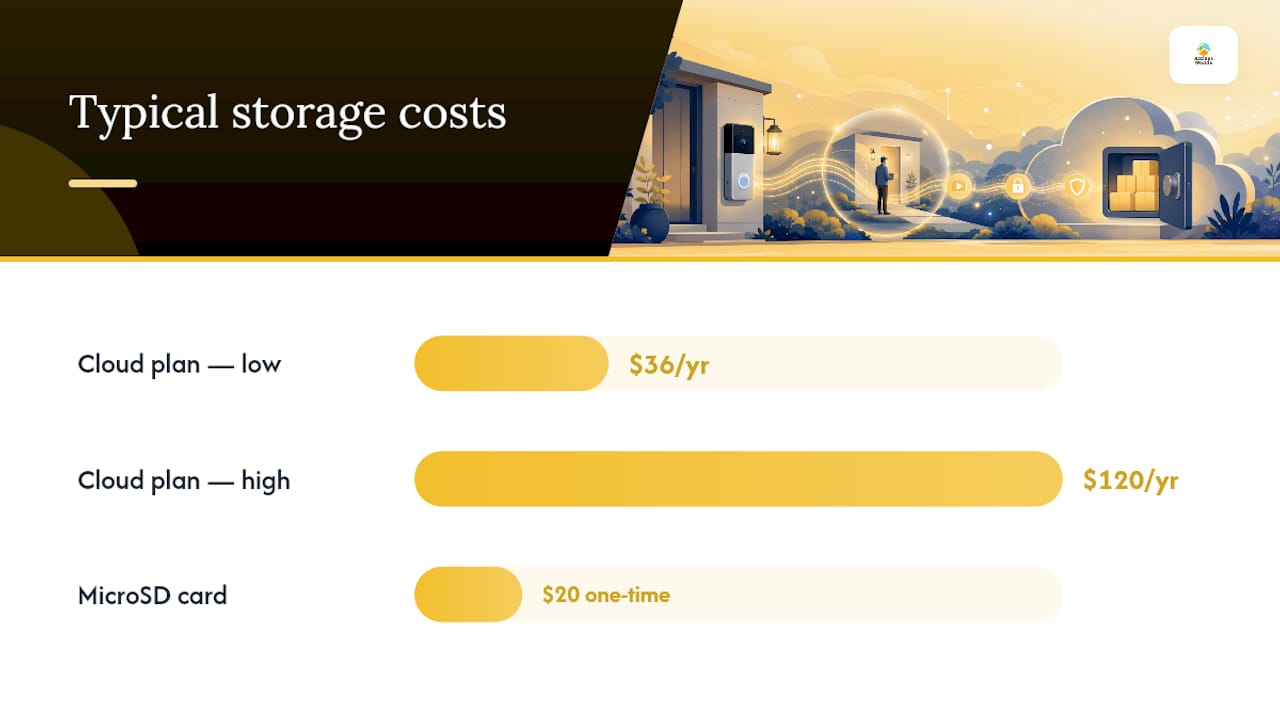
Local storage saves money over time. A typical cloud plan runs $3 to $10 per month depending on the brand and number of cameras, which adds up to $36 to $120 a year for a single doorbell. A microSD card is a one-time cost, usually under $20.
Skip subscriptions if you own one or two doorbells, don’t need multi-month video history, and prefer footage that stays on hardware you physically control. Lean toward a subscription if you run several cameras across the property, want AI-driven package or delivery alerts layered on top of raw motion detection, or simply don’t want to manage a memory card.
Installation and Compatibility Checklist
Most doorbell returns trace back to a compatibility issue that a five-minute check would have caught before purchase.
- Test your existing chime wiring. If replacing a wired doorbell, check whether your transformer outputs 16 to 24 volts AC. Battery models skip this step entirely and remain the safer choice for older homes.
- Confirm chime compatibility. Wired mechanical chimes sometimes need a bypass kit or a smart chime adapter to work with a video doorbell; some manufacturers include one, others sell it separately.
- Check for mounting angle adapters. Corner installs or angled doorframes benefit from wedge or angle mounts, usually sold alongside the doorbell or as a low-cost add-on.
- Address the blind spot under the unit. Dual-camera designs with a lower-mounted secondary lens meaningfully reduce the blind spot directly beneath the doorbell, a common complaint with single-camera units when packages get set down close to the door.
- Verify your Wi-Fi can handle 2K or 4K streaming. A dedicated 2.4GHz band with a strong signal at the door is usually sufficient; if your router sits far from the entry, a mesh extender or dedicated access point avoids dropped connections during live view.
- Consider PoE if you want continuous recording. PoE eliminates both battery charging and Wi-Fi reliability concerns, but you’ll need a PoE-capable switch or an injector, plus an auxiliary power module if your existing rack doesn’t already supply it.
- Battery models need an indoor chime or app notifications. Since they don’t tap into house wiring, confirm the doorbell ships with a plug-in indoor chime or relies solely on phone notifications, which matters if you don’t always carry your phone at home.
Privacy and Security Checklist After Installation
Buying the right hardware is half the job. Locking it down properly is the other half, and it takes about fifteen minutes.
- Turn on two-factor authentication for the doorbell’s app account immediately, and use a password you’re not reusing anywhere else.
- Review sharing and access settings in the app. Many platforms default to broader household or neighborhood sharing than you’d expect.
- Put smart home devices on a separate network. A guest SSID or a VLAN dedicated to IoT devices keeps a compromised doorbell from becoming a foothold into your laptop or NAS.
- Keep firmware current. Enable automatic updates where offered, since security-focused reviewers increasingly flag update cadence as a real differentiator between vendors, not just a checkbox feature.
- Encrypt local storage where supported, and keep any hub or NVR physically secured, ideally inside the house rather than in an accessible garage or shed.
- Read the privacy policy for data-sharing language. Watch for vague terms around “service providers” or “partners” that may indicate footage gets shared beyond what’s needed to run the app.
Pro Tip: If a vendor’s privacy policy takes more than two paragraphs to explain who can access your footage and why, treat that as a red flag rather than fine print to skip past.
How We Picked These Video Doorbells
These recommendations lean on hands-on lab testing from established review outlets rather than manufacturer marketing claims. The core metrics that matter: video resolution and HDR handling in real lighting conditions, detection accuracy for people versus vehicles versus false triggers, response latency between motion and alert, storage flexibility (local versus cloud-only), privacy controls, and how complicated installation turns out to be in practice.
- Hands-on and lab-based testing from Consumer Reports, which specifically evaluates subscription-free performance.
- Broader market roundups and specs comparisons that track how models perform across resolution, field of view, and subscription models.
- Our catalog depth, spanning consumer electronics and smart home hardware with detailed product pages and fast shipping on in-stock items, informs which models we point readers toward for purchase. That same product-testing approach shows up in how Atticus Goods evaluates webcams for video calls, where spec comparisons matter just as much.
One limitation worth naming: doorbell firmware and pricing change often, sometimes month to month. Treat specific price bands here as directional rather than fixed, and always verify current specs on the product listing before buying.
What Actually Matters for Smart Doorbell Buyers in 2026
The biggest shift this year isn’t resolution, it’s where the intelligence lives. On-device AI has gotten good enough that subscription-free doorbells no longer feel like a compromise the way they did a few years back, and that changes the calculus for anyone who was avoiding local storage because detection used to be dumber without the cloud.
My honest take: most buyers overweight camera specs and underweight ecosystem fit. A slightly lower-resolution doorbell that talks cleanly to the locks, lights, and hub you already own will make your daily life easier than a marginally sharper camera that lives in its own isolated app. Chase ecosystem compatibility first, then optimize specs within that constraint, not the other way around.
If you’re an advanced buyer building out a full smart home rather than just wanting a camera at the door, prioritize a doorbell with open local storage options and solid third-party integration over one that locks you into a single vendor’s closed ecosystem. That flexibility tends to matter more three years from now than it does on install day.
— Matthew Vista
Where to Buy Your Video Doorbell
There are plenty of places to research specs online, but the actual buying decision gets a lot easier once you know exactly what’s in stock. We offer a wide catalog of consumer electronics and smart home gear with fast shipping on in-stock items, so you’re not waiting weeks for hard-to-find doorbells.

Before checkout, run through a short list: confirm the power type matches your home (wired, battery, or PoE), check whether mounting hardware and a compatible chime adapter ship in the box or need to be ordered separately, and look for bundle pricing if you’re buying a power accessory alongside the doorbell itself. If you’re outfitting a full network closet for PoE, an auxiliary power supply is worth adding to the cart at the same time so your install doesn’t stall waiting on a second shipment. Our broader selection, covering everything from networking gear to smart home hubs, also means you can round out your setup in a single order rather than hunting across multiple retailers the way you might with other electronics marketplaces.
Browse current video doorbell and smart home listings at Atticus Goods and check the product page for exact power requirements and included accessories before you place your order.
Sources
- Best video doorbell cameras without a subscription — Consumer Reports
- The Best Video Doorbells of 2026: Watch Porches, Packages and More — CNET
- The Best Video Doorbell Cameras — WIRED
FAQ
What’s the best video doorbell to buy in 2026?
There’s no single best model for everyone, but the strongest overall pick for most homes is a battery or wired doorbell with 2K resolution, a field of view of 150 degrees or wider, and on-device person and package detection, ideally with local storage so you’re not locked into a subscription.
Is there a better system than a Ring doorbell?
Yes, depending on your priorities. If avoiding subscriptions matters most, Consumer Reports’ testing points to Eufy, TP-Link, Wyze, and Reolink as strong alternatives that perform well on nighttime video and response time without a mandatory monthly fee.
Do I need a subscription to use a video doorbell?
No. Many models now offer local storage through microSD cards, hub-based storage, or NVR and FTP syncing, letting you keep footage without paying a recurring fee, though you’ll typically get less video history than a paid cloud plan offers.
What’s the minimum field of view I should look for?
Aim for at least 150 degrees. Anything narrower tends to crop out visitors standing to the side of your door or miss head-to-toe framing needed for clear identification.
Should I choose a wired, battery, or PoE video doorbell?
Choose wired if your existing transformer outputs 16 to 24 volts AC and you want continuous power, battery if you want to skip an electrician entirely, and PoE if you want the most reliable continuous recording and already have or can add PoE-capable network hardware.