

A SKU system is your internal product identifier that makes inventory tracking, sales reporting, and order fulfillment work together instead of fighting each other. Every item you sell gets a unique code that your point-of-sale system, your warehouse, and your online store all reference the same way, so stock counts stay accurate and reordering stops being a guessing game.
Here’s what to do this week:
- Write a simple SKU template (category, attribute, variant) before you touch any software.
- Map your master SKU list into your POS, ecommerce platform, and warehouse system so all three read the same code.
- Pilot the system on one product category for 30 days before rolling it out store-wide.
Statistic Callout: Most SKUs run 8 to 12 characters long, long enough to encode category, size, and color without becoming unreadable at a glance.
Key Takeaways
A SKU system succeeds when a single master code, mapped consistently across every sales channel, drives real-time inventory accuracy and reorder decisions.
| Point | Details |
|---|---|
| SKU length and format | Keep codes to 8 to 12 characters using a hierarchical template like category, attribute, variant. |
| Master SKU as source of truth | Map one master code to every channel identifier to prevent oversells and phantom inventory. |
| Real-time sync is non-optional | Batch updates between POS and ecommerce create the lag that causes phantom inventory. |
| Governance prevents drift | Assign one owner for SKU creation and document abbreviations in a master list. |
| Audit on a fixed cadence | Run rationalization quarterly or biannually to retire dead SKUs and catch mapping errors. |
Ready to put this into practice? Browse the in-stock catalog at Atticus Goods to see how SKU-level organization works across electronics, marine gear, and accessories, or reach out to the team for guidance on fast, next-day fulfillment for your next order.
Table of Contents
- What Is a SKU and How Does It Differ From a UPC?
- How Does a SKU System Work From Item Creation to Sale?
- What Are the Main Benefits of a SKU System in Retail?
- How Should You Design SKU Naming Conventions?
- How Do You Generate SKUs: Manual, Spreadsheet, or Automated?
- Where Do SKUs Live Across POS, Ecommerce, and Warehouse Systems?
- What Are the Most Common SKU Mistakes to Avoid?
- How Does Real-Time Sync Prevent Phantom Inventory?
- What Do Sample SKU Templates Look Like by Category?
- How Do You Implement a SKU System Step by Step?
- Frequently Asked Questions
- Sources
What Is a SKU and How Does It Differ From a UPC?
A stock keeping unit is an internal, alphanumeric code you design yourself to identify a specific product variant for tracking, reordering, and reporting. It typically runs 8 to 12 characters and encodes attributes like category, size, and color directly into the string. Unlike a barcode or a manufacturer’s model number, a SKU belongs entirely to you. Two different stores selling the identical pair of boots will almost certainly assign different SKUs to it.
A SKU has three defining properties:
- Customizable. You decide the format, length, and logic.
- Human-readable. A trained employee can often decode the product just by reading the code.
- Variant-specific. Each size, color, or style gets its own distinct SKU, not a shared product-level code.
This is where confusion usually starts, because SKUs, UPCs, model numbers, and barcodes get used interchangeably even though they serve different purposes.
| Identifier | Who assigns it | Scope |
|---|---|---|
| SKU | Retailer (you) | Internal only, unique to your business |
| UPC | Manufacturer, via GS1 | Universal across all retailers |
| Model number | Manufacturer | Identifies a product line, not a specific variant |
| Barcode | Encodes a UPC or SKU | Scannable format for either code |
The GS1 standards body manages UPC assignment, which is why UPCs stay identical no matter where a product is sold, while your SKU is yours alone. One practical wrinkle worth knowing early: ecommerce platforms cap SKU length. Shopify and Amazon both enforce character limits on the SKU field, so a naming convention that looks clean on paper can get truncated the moment you list a product online.
How Does a SKU System Work From Item Creation to Sale?
A SKU system works by moving a single identifier through five checkpoints, and if any checkpoint falls out of sync, your inventory count stops matching reality. Here’s the flow:
- Item creation. A new product arrives, and you assign it a SKU based on your naming template.
- Catalog entry. The SKU gets entered into your master inventory system alongside cost, price, and supplier data.
- Listing. The same SKU (or its channel-mapped equivalent) appears on your POS terminal, your website, and any marketplace listings.
- Sale or scan. A cashier scans a barcode tied to that SKU, or a customer completes a checkout online.
- Inventory decrement and reporting. The system automatically subtracts one unit from stock and logs the sale for reporting and reorder calculations.
Your POS and warehouse management system read the SKU as a lookup key. Scanning a barcode doesn’t identify the product directly. It pulls up the SKU record, which then triggers the price, description, and stock adjustment tied to it. That handoff between scan and database is where most inventory problems actually originate.
Pro Tip: If your POS updates inventory in real time but your ecommerce store syncs only once every few hours, you’ll sell items online that are already gone from the shelf. That lag is what creates “phantom inventory,” and it’s one of the fastest ways to generate refunds and angry customers.

When the flow works correctly, every sale updates one shared source of truth instead of three disconnected spreadsheets. When it doesn’t, you get the frustrating experience of a system saying “12 in stock” while the shelf shows zero.
What Are the Main Benefits of a SKU System in Retail?
SKU management delivers measurable operational gains, not just organizational tidiness. According to Investopedia, a well-run SKU system improves inventory accuracy, speeds up order fulfillment, keeps pricing and stock consistent across channels, and gives you the reporting granularity needed to decide what to reorder and what to cut.
The core benefits break down like this:
- Inventory accuracy — you know what you actually have, not what you think you have.
- Faster picking and fulfillment — warehouse staff locate items by code instead of description.
- Automated reordering — reorder points trigger purchase orders before you run dry.
- Forecasting and demand planning — variant-level sales data reveals which sizes or colors actually move.
- Channel consistency — the same product shows the same stock count everywhere it’s listed.
Statistic Callout: PayPal’s business resources describe SKU-level data as a source of forecasting insight, because tracking sales by variant, rather than by product line, separates a fast-selling medium shirt from a slow-selling extra-large in the same style.
The practical payoff shows up differently depending on your setup:
- Brick-and-mortar stores use SKUs to speed up cycle counts and catch shrinkage faster.
- Pure ecommerce sellers rely on SKUs to prevent overselling when demand spikes.
- Omnichannel retailers need SKUs mapped across every channel so a sale in-store instantly reflects online, and vice versa.
How Should You Design SKU Naming Conventions?
The naming convention you choose determines whether your SKU system scales or collapses under its own weight in two years. A hierarchical template works better than an arbitrary one because it encodes meaning directly into the code. OmniOrders recommends a structure like [Category]-[Attribute 1]-[Attribute 2]-[Variant], which lets any trained employee decode a product without checking a separate reference sheet.
A few examples of what that looks like in practice:
- Apparel:
SHRT-MEN-BLU-L(shirt, men’s, blue, large) - Electronics:
CBL-USBC-6FT-BLK(cable, USB-C, six feet, black) - Consumables:
COF-DRK-12OZ-GRND(coffee, dark roast, 12 ounces, ground)
Before you finalize a template, run it against this checklist:
- Avoid the letter O and the number 0 in the same code. They’re nearly impossible to tell apart on a printed label.
- Cap length around 12 to 15 characters so it survives platform limits without truncating.
- Use the same abbreviation every time. “BLK” for black in one SKU and “BLCK” in another breaks searchability.
- Keep a documented master list that maps every abbreviation to its full meaning.
Pro Tip: Assign SKU-creation authority to one person or one small team. The moment multiple people invent their own shorthand, your catalog starts drifting, and untangling six months of inconsistent codes takes far longer than writing the rules down on day one.
How Do You Generate SKUs: Manual, Spreadsheet, or Automated?
Which method you use depends almost entirely on catalog size. A shop with 50 products can manage manual SKU creation in a spreadsheet without much friction. A shop pushing past a few hundred SKUs, or one selling across multiple channels, benefits from automation built into inventory or POS software, since Square notes that many platforms generate SKUs automatically alongside barcode printing and low-stock alerts.
Three approaches, in order of complexity:
- Manual creation — you type each SKU by hand following your template. Fine for small catalogs, error-prone past a hundred items.
-
Spreadsheet-rule generation — a formula concatenates category, attribute, and variant fields automatically (something like
=CONCAT(A2,"-",B2,"-",C2)), reducing typos while still needing manual oversight. - Automated system generation — your inventory management system or POS assigns SKUs on creation, often with built-in duplicate checking.
The break-even point is worth naming plainly: once you’re adding SKUs weekly rather than monthly, or selling on more than one marketplace, the hours saved by automation usually outweigh the software cost within a single sales quarter. If you’re evaluating what to run this on, tools built for growing retail operations tend to bundle SKU generation with the inventory tracking you’ll need anyway.
Where Do SKUs Live Across POS, Ecommerce, and Warehouse Systems?
A SKU only creates value when the same code, or a properly mapped version of it, exists in every system that touches inventory. That means your point-of-sale terminal, your inventory management system, your warehouse management system, your order management system, and every marketplace where you list products all need to agree on what a given SKU represents.
The integration checklist looks like this:
- Establish one master SKU as the single source of truth.
- Build a channel mapping table that translates the master SKU into each platform’s required format (Amazon ASIN, Shopify’s SKU field, eBay’s item number).
- Confirm real-time sync between your POS and every sales channel, not batch updates every few hours.
- Print and apply barcode labels that scan cleanly at every checkpoint, from receiving to checkout.
- Run reconciliation routines on a set schedule to catch drift between systems before it becomes a customer-facing problem.
Retailers managing purchase orders across suppliers can find this workflow easier to visualize by looking at how structured purchasing guides handle receiving and SKU-level tracking from the supplier side.
Pro Tip: If you sell on three or more channels, an order management system that handles master SKU translation automatically is worth the cost. Doing channel mapping by hand in a spreadsheet works until you add a fourth marketplace, and then it becomes a part-time job.
What Are the Most Common SKU Mistakes to Avoid?
Most SKU problems trace back to a small handful of avoidable errors, and catching them early costs far less than fixing them after your catalog has grown to thousands of items.
- Duplicate SKUs — run a uniqueness check monthly; two products sharing a code corrupts every report downstream.
- Inconsistent abbreviations — audit your master list quarterly for drift.
- Mixing SKU and UPC fields — keep them in separate database columns, always.
- No governance — name one owner for SKU creation today.
- Unmapped channels — verify every marketplace listing links back to your master SKU.
- Missing barcode labels — spot-check shelves for unlabeled or mislabeled stock.
- Poor location data — pair every SKU with a bin or shelf reference.
- Skipped audits — schedule cycle counts, don’t wait for annual inventory.
- Overlong SKUs — test codes against your platform’s character limit before launch.
- Ignoring returns and scrap — decrement inventory the moment a return is processed, not at month end.
A quick quarterly audit that just checks for duplicates and unmapped channels usually catches the majority of accuracy problems before they show up as an oversell.
How Does Real-Time Sync Prevent Phantom Inventory?
Phantom inventory happens when your system says an item is in stock but it’s already sold, damaged, or misplaced, and the root cause is almost always a sync delay between your POS and your other sales channels. OmniOrders points to missing real-time synchronization as the direct driver of this problem, because any lag between the moment an item sells and the moment every system reflects that sale creates a window where you can oversell the same unit twice.
The controls that prevent it are straightforward:
- Maintain one master SKU per item as the anchor for every count.
- Keep channel mapping current the moment you add or remove a sales channel.
- Push real-time updates rather than batch syncs on a delay.
- Run periodic rationalization to retire dead SKUs that clutter reporting.
Statistic Callout: SKUs typically run 8 to 12 characters, which matters here too: shorter, well-structured codes are easier to reconcile across systems during an audit than sprawling, inconsistent ones.
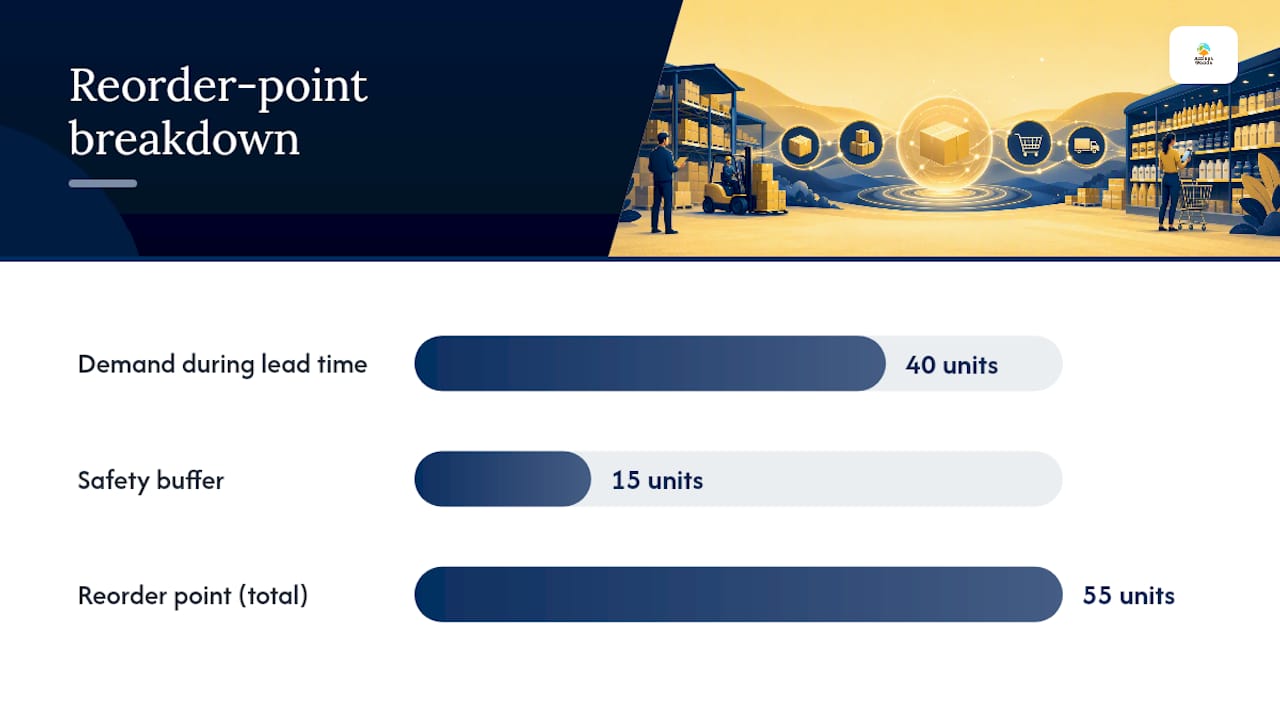
A basic reorder-point calculation shows how this data gets used day to day: multiply your average daily units sold by your supplier lead time in days, then add a safety-stock buffer. Sell 4 units a day, wait 10 days for restock, and keep a 15-unit safety buffer, and your reorder point sits at 55 units. Without accurate SKU-level sales history, that number is a guess instead of a calculation.
Tracking sales at the SKU level, rather than averaging across an entire product line, is what actually makes forecasting and reorder timing reliable, because it separates a fast-moving variant from a slow one hiding inside the same aggregate number.
The GS1 standards body governs the barcode side of this equation, ensuring the scan itself is reliable even when the SKU logic behind it is entirely yours to design.
What Do Sample SKU Templates Look Like by Category?
Different product categories need different attributes baked into the code, and seeing a few side by side makes the logic click faster than any abstract rule.
| Category | Schema segments | Meaning | Example SKU |
|---|---|---|---|
| Apparel | Type, gender, color, size | Shirt, men’s, navy, large | SHRT-MEN-NVY-L |
| Electronics | Product, spec, length, color | USB-C cable, fast-charge, 6 ft, black | CBL-USBC-6FT-BLK |
| Consumables | Product, variety, size, form | Coffee, dark roast, 12 oz, ground | COF-DRK-12OZ-GRND |
A few notes on when to extend these templates. Add a batch or lot number when you’re tracking perishables, supplements, or anything with expiration dates, but keep it as a separate field rather than folding it into the SKU itself. Add a serial number for high-value electronics or anything under individual warranty, since that level of tracking matters for returns and repairs. For a lower-cost accessory or a consumable, skip both. Adding batch or serial tracking to a $12 cable creates administrative overhead with no real payoff. Product categories like the ones covered in this tech accessories guide illustrate how varied electronics naming needs to be to stay useful.
How Do You Implement a SKU System Step by Step?
Rolling out a SKU system works best as a contained pilot rather than a catalog-wide overhaul on day one.
- Design your schema. Pick your hierarchical template and document every abbreviation.
- Build the master list. Enter existing products into a central spreadsheet or database before touching any software.
- Choose your systems. Confirm your POS, ecommerce platform, and warehouse tool all support your SKU format and length.
- Pilot on one category. Run the new system on a single product line for 30 days.
- Measure results. Track inventory accuracy, pick-error rate, and any oversell incidents during the pilot.
- Train staff. Walk your team through the naming logic and where to look up SKU meanings.
- Roll out catalog-wide. Expand once the pilot shows measurable improvement.
- Schedule ongoing audits. Set a recurring cadence, quarterly or biannual, to rationalize dead SKUs and catch drift.
| Role | Responsibility |
|---|---|
| Inventory manager | Creates and approves new SKUs against the master template |
| Store or warehouse staff | Applies barcode labels and flags mismatches during receiving |
| Ecommerce or ops lead | Maps master SKUs to each marketplace and sales channel |
| Owner or manager | Reviews quarterly audit results and approves rationalization |
Success on your pilot should show up in three places: a measurable rise in inventory accuracy during cycle counts, a drop in picking errors in the warehouse, and zero or near-zero oversell incidents across channels. If any of those metrics doesn’t budge after 30 days, the problem is usually a mapping gap, not the SKU template itself. Reviewing how order tracking tools connect to your fulfillment data can help isolate exactly where that gap sits.
What Goes Wrong During Rollout (and One Shortcut That Helps)
Scope creep kills more SKU rollouts than bad templates do. Teams try to rename every SKU at once instead of piloting first, skip channel mapping until oversells force the issue, and invent abbreviations on the fly. The fix: build a master SKU for your top 20% of revenue-generating products first, prove the system works, then expand. Document every rule as you go, or catalog drift creeps back within a year.
Frequently Asked Questions
What is a SKU system in retail, exactly?
A SKU system is the internal method retailers use to assign a unique alphanumeric code to every product variant they sell, enabling accurate inventory tracking, reordering, and sales reporting across POS and ecommerce channels.
How does a SKU system work with barcodes?
A barcode encodes either a SKU or a UPC into a scannable format. When a cashier scans it, the POS system looks up the corresponding SKU record to pull price, description, and stock data, then decrements inventory automatically.
Do small retailers need a formal SKU system?
Yes, even a shop with under a hundred products benefits from a documented SKU template, since inconsistent or duplicate codes cause reporting errors that compound as the catalog grows.
How is a SKU different from a UPC?
A SKU is created and owned by the retailer for internal use, while a UPC is a universal, manufacturer-assigned code managed through GS1 that stays the same across every store selling that product.
How often should retailers audit their SKU system?
A quarterly or biannual rationalization review, ranking SKUs by units sold and margin, catches duplicate codes, unmapped channels, and dead inventory before they distort reporting.
Sources
- What Is a Stock Keeping Unit (SKU) & How Does It Work? | NetSuite
- SKU Management for E-commerce: The Complete Guide 2026 | OmniOrders Blog
- What is a SKU? | PayPal business resources
- GS1 US – UPCs & barcodes (GS1 guidance)
- SKU: What It Means and How To Use It | Square