

A network switch is a hardware device that connects multiple devices within a local area network and directs data traffic to the correct destination. The role of network switch in business goes far beyond simple connectivity. Switches from Cisco, Aruba, and Juniper actively manage traffic flow, prevent congestion, and form the backbone of every reliable business network infrastructure. As cloud applications, IoT devices, and video conferencing continue to drive annual traffic growth exceeding 10%, the switch sitting in your server rack is no longer passive hardware. It is a strategic asset.
What is the role of network switches in business?
Network switches operate at Layer 2 of the OSI model, learning the MAC address of every connected device and forwarding traffic only where needed. This is fundamentally different from a hub, which broadcasts every packet to every port regardless of destination. The difference matters enormously at scale. A hub in a 50-device office creates constant collisions. A switch eliminates them.
Modern switches perform traffic segmentation to prevent broadcast storms and collisions, which are the two most common causes of LAN instability. Broadcast storms occur when network packets multiply uncontrollably across a segment. Switches contain this by isolating traffic within defined boundaries.

Quality of Service (QoS) is another critical network switch function. QoS lets you prioritize voice and video traffic over file transfers, so a video conference call does not stutter because someone in accounting is downloading a large report. Security also lives at the switch level. Port-based access control and VLAN segmentation stop unauthorized devices from reaching sensitive network segments.
Switches vs. hubs vs. routers: a direct comparison
| Device | Layer | Traffic Handling | Business Use |
|---|---|---|---|
| Hub | Layer 1 | Broadcasts to all ports | Obsolete; avoid in any business setting |
| Switch | Layer 2/3 | Forwards to specific MAC address | Core LAN device for all business sizes |
| Router | Layer 3 | Routes between networks | Connects LAN to WAN or internet |
Pro Tip: Never replace a failed hub with another hub. Even a basic unmanaged switch from Netgear or TP-Link delivers dramatically better performance at a comparable price point.
What types of network switches serve different business needs?
Switch selection is where most businesses either get it right or pay for it later. The four primary categories are unmanaged, managed, Power over Ethernet (PoE), and Layer 3 switches. Each serves a distinct role in business network infrastructure.
Unmanaged switches require zero configuration. You plug them in and they work. They suit small offices with fewer than 10 devices and no need for traffic visibility. The trade-off is total lack of control. You cannot segment traffic, monitor ports, or enforce security policies.
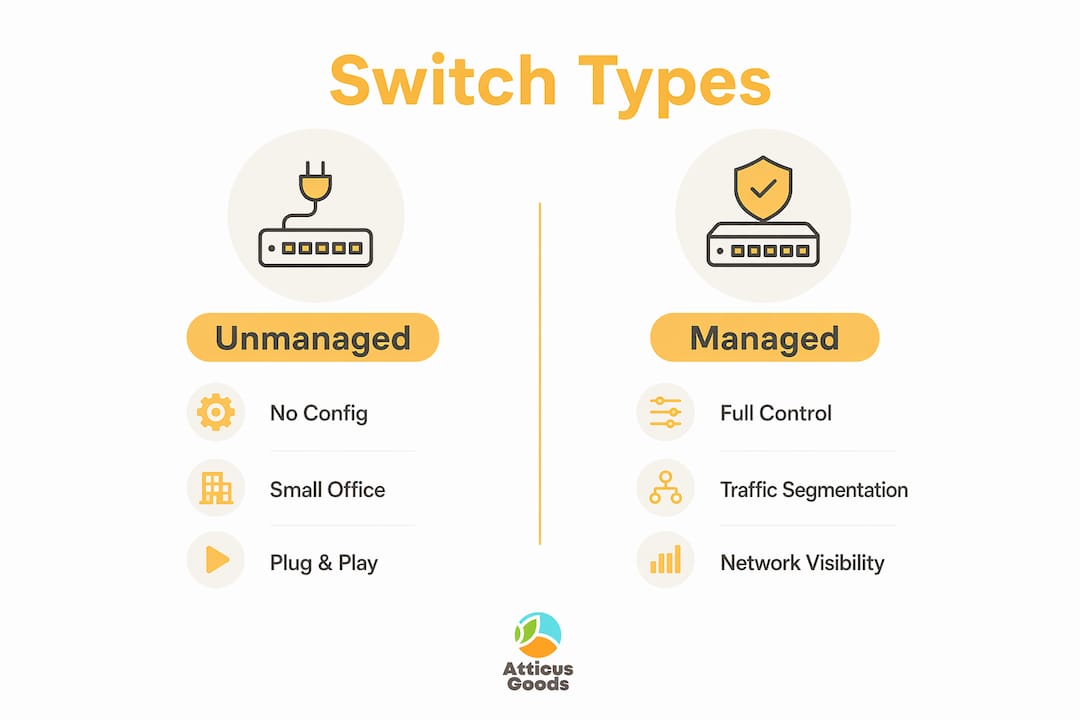
Managed switches expose full control over your network. Managed switches allow traffic segmentation and network visibility through VLANs, port mirroring, and SNMP monitoring. For any business running IP phones, security cameras, or cloud-connected services, a managed switch is the minimum viable option.
PoE switches eliminate the need for separate power adapters at every endpoint. PoE supports powering edge devices through the network cable, including VoIP phones, wireless access points, and IP cameras. A single PoE switch can replace dozens of power bricks across a floor plan, cutting installation time significantly.
Layer 3 switches combine switching and routing in one device. Layer 3 switches perform routing tasks in addition to packet switching, making them the right choice for enterprises that need inter-VLAN routing without deploying a dedicated router at every network segment.
Switch type comparison by business need
| Switch Type | Configuration | Best For | Key Benefit |
|---|---|---|---|
| Unmanaged | None | Small offices, home labs | Low cost, plug-and-play |
| Managed | Full CLI or GUI | Mid to large enterprises | VLANs, QoS, monitoring |
| PoE | Varies | Offices with IP phones, cameras | Powers devices over cable |
| Layer 3 | Advanced | Multi-subnet enterprise networks | Routing without dedicated router |
For a deeper breakdown of each category, the network switch types guide at Atticus Goods covers selection criteria specific to modern IT environments.
Why are network switches critical for business scalability?
Switches support hybrid work infrastructure with traffic management and security features that scale as your organization grows. This is the core argument for treating switch selection as a strategic decision rather than a commodity purchase. The wrong switch today becomes a bottleneck tomorrow.
Network segmentation through VLANs is the clearest example of this. A business that separates its guest Wi-Fi, employee workstations, and IP security cameras onto distinct VLANs gains both security and performance. Guest traffic cannot reach internal file servers. Camera streams do not compete with VoIP calls for bandwidth.
Port misconfiguration and cable quality are leading causes of network latency that are hard to trace without switch monitoring. This is a critical point for troubleshooting. When users report intermittent connectivity, the switch is the first device to examine, not the ISP or the server. A misconfigured port duplex setting can throttle a gigabit connection to a fraction of its rated speed without triggering any obvious alarm.
“Business owners should view switches as strategic architectural elements impacting long-term network performance and operational costs, not just hardware purchases.” — NetworkTigers
Lifecycle management matters here too. Switches running outdated firmware miss security patches and performance improvements. A managed switch with centralized monitoring through platforms like Cisco DNA Center or Aruba Central gives IT teams visibility into port utilization, error rates, and traffic patterns before problems escalate.
Pro Tip: Schedule quarterly firmware reviews for all managed switches. Vendors like Cisco, Juniper, and Aruba release patches that address both security vulnerabilities and performance bugs. Skipping these updates is the single most common oversight in mid-market IT environments.
How should IT professionals select and manage network switches?
Choosing the right switch starts with four concrete questions. What speed does your network require? What devices need PoE power? Do you need VLAN segmentation or traffic monitoring? How many ports will you need in 18 months, not today?
Choosing switches with compatible management protocols and network speeds reduces operational friction and facilitates smooth network scaling. This means matching your switch to your uplink speed. A 1G switch feeding a 10G uplink port creates an immediate bottleneck. Verify that your switch supports the same management protocol as the rest of your stack, whether that is SNMP, NETCONF, or a vendor-specific API.
Key selection criteria to evaluate before purchasing:
- Port count and density: Buy 20–30% more ports than your current device count requires.
- PoE budget: Total wattage available across all PoE ports must exceed the combined draw of all connected devices.
- Uplink speed: Core switches should support 10G uplinks to avoid congestion at the aggregation layer.
- Management interface: Cloud-managed options from Cisco Meraki or Aruba Instant On simplify remote administration for distributed teams.
- Stacking capability: Stackable switches from Cisco Catalyst or Netgear M4350 series allow you to manage multiple units as a single logical device.
For day-to-day management, traffic analysis tools like SolarWinds Network Performance Monitor or PRTG Network Monitor give you real-time visibility into port errors, bandwidth consumption, and device health. Reactive troubleshooting is expensive. Proactive monitoring is not.
Pro Tip: When integrating wireless access points, confirm that your switch supports 802.3at (PoE+) or 802.3bt (PoE++) before purchasing APs from Aruba, Ubiquiti, or Cisco. Underpowered PoE ports cause intermittent AP reboots that are notoriously difficult to diagnose.
If you are setting up a new office environment, the office network switch setup guide at Atticus Goods walks through the full deployment process for 2026 infrastructure standards.
What trends are shaping the future of business network switches?
The next generation of business switching is defined by speed, intelligence, and tighter integration with cloud platforms. Several trends are reshaping what IT professionals should plan for now.
- 10G and 25G Ethernet adoption: Workloads driven by AI tools, 4K video conferencing, and large file transfers are pushing 1G access ports toward obsolescence in data-intensive environments. Switches supporting 10G access ports are now standard in new enterprise deployments.
- Expanded PoE standards: IEEE 802.3bt delivers up to 90 watts per port, enabling switches to power devices like digital signage, pan-tilt-zoom cameras, and thin client workstations without separate power infrastructure.
- Cloud-managed switching: Platforms like Cisco Meraki, Aruba Instant On, and TP-Link Omada provide centralized dashboards that manage switches across multiple locations from a single pane of glass. This is the defining feature for businesses with hybrid or distributed workforces.
- AI-driven network optimization: Vendors are embedding machine learning into switch operating systems to detect anomalies, predict failures, and automatically adjust QoS policies based on real-time traffic patterns.
- Zero-trust network access (ZTNA) at the switch layer: Security policies are moving closer to the access layer. Modern managed switches enforce identity-based access control, ensuring that a device connecting to a port must authenticate before receiving network access.
Key takeaways
Network switches are the most operationally consequential devices in any business network, and selecting the wrong type creates bottlenecks, security gaps, and scaling problems that compound over time.
| Point | Details |
|---|---|
| Switches direct traffic precisely | Unlike hubs, switches forward data only to the intended device, preventing collisions and congestion. |
| Switch type determines control level | Managed switches enable VLANs, QoS, and monitoring; unmanaged switches offer none of these capabilities. |
| PoE switches simplify deployments | PoE eliminates separate power adapters for IP phones, cameras, and wireless access points. |
| Switches are the first troubleshooting point | Port misconfigurations and cable faults cause latency that is often misattributed to ISPs or servers. |
| Future-proofing requires 10G and cloud management | New deployments should include 10G uplinks and cloud-managed options to handle growing traffic demands. |
Why i think most businesses underinvest in switch infrastructure
I have seen the same pattern repeat across dozens of network deployments. A business spends heavily on firewalls and endpoint security, then installs a $79 unmanaged switch at the core of its LAN. Six months later, the IT team is chasing phantom connectivity issues that turn out to be a duplex mismatch on a single port.
The misconception that switches are mere plugs is the most expensive mistake in business networking. A misconfigured managed switch is worse than a well-configured unmanaged one, but a properly deployed managed switch from Cisco, Aruba, or Netgear pays for itself in avoided downtime within the first year.
My honest recommendation: size up one tier from what you think you need. If you are considering an unmanaged switch, buy a managed one. If you are looking at a managed switch, evaluate whether a cloud-managed option gives your team the remote visibility it will eventually need. The incremental cost is small. The operational difference is not.
The businesses I have seen handle network growth most gracefully are the ones that treated their switching infrastructure as a long-term architecture decision from day one. They planned VLAN structures before they needed them. They bought stackable switches before their port counts forced an emergency upgrade. That kind of forward planning is not expensive. Ignoring it is.
— Matthew Vista
Find the right network switch at atticus goods
Atticus Goods carries a broad selection of enterprise-grade networking hardware, including managed and PoE switches from Netgear, Cisco, and other trusted brands. Whether you are building out a new office network or upgrading aging infrastructure, the catalog covers switches at every tier, from small-office unmanaged units to high-density stackable models.

The Netgear Business GS728TXUPv3 and the Netgear Business GS752TXUPv3 are two strong options for businesses that need PoE+ support and 10G uplinks in a single managed unit. Both ship with next-day delivery across the United States. Browse the full networking hardware catalog at Atticus Goods to find the right switch for your infrastructure requirements.
FAQ
What does a network switch do in a business?
A network switch connects devices within a local area network and directs data traffic to the correct destination using MAC address learning. This prevents congestion and keeps communication between workstations, servers, IP phones, and wireless access points running efficiently.
What is the difference between a managed and unmanaged switch?
Managed switches provide full control over traffic through VLANs, QoS, and port monitoring, while unmanaged switches offer no configuration options. Businesses with more than a handful of devices or any security requirements should use managed switches.
Do i need a PoE switch for my office?
A PoE switch is the right choice if your office uses IP phones, wireless access points, or IP security cameras. PoE delivers power through the network cable, eliminating the need for separate power adapters at each device location.
How does a layer 3 switch differ from a layer 2 switch?
A Layer 3 switch performs both packet switching and IP routing, allowing traffic to move between different VLANs or subnets without a dedicated router. Layer 2 switches handle only switching within a single network segment.
How often should business network switches be replaced?
Most enterprise-grade switches from Cisco, Aruba, and Netgear have a useful life of 5–7 years, after which firmware support ends and hardware failure rates increase. Replacing switches on a planned cycle avoids unplanned downtime and keeps your network eligible for security patches.