

Fiber optic Ethernet is a networking technology that transmits data as pulses of light through glass or plastic fibers, delivering speeds, distances, and interference immunity that copper Ethernet cables cannot match. The industry standard term is optical fiber Ethernet, and it covers everything from 10GBASE-SR multimode links inside a building to 10GBASE-LR single-mode runs spanning kilometers between sites. For individuals and small business owners comparing options, the core question is not whether fiber is faster on paper. The real question is whether the advantages of ethernet fiber translate into measurable, day-to-day reliability gains worth the investment. They do, with the right architecture.
Why use fiber optic Ethernet instead of copper cables?
Fiber wins on physics. Copper Ethernet carries electrical signals, which means every cable run is vulnerable to electromagnetic interference (EMI) and radio frequency interference (RFI) from motors, HVAC systems, fluorescent lighting, and nearby power lines. Fiber transmits light pulses that are completely unaffected by EMI and RFI, which is why fiber links in industrial environments, warehouses, and multi-tenant office buildings maintain clean signal integrity where copper degrades.

Distance is the second decisive factor. Standard copper Ethernet tops out at 100 meters per segment. Fiber Ethernet links reach up to 100 km depending on the transceiver and fiber type. That gap matters the moment you need to connect two buildings, span multiple floors of a large facility, or link a server room to a remote switch without a signal repeater in between.
Error rates tell the same story. Fiber links produce lower bit error rates under load because light does not attenuate the way electrical signals do over distance, and the medium itself does not pick up noise. In practical terms, this means fewer retransmissions, lower effective latency, and more consistent throughput during peak traffic.
- Fiber is immune to EMI and RFI, unlike shielded or unshielded copper
- Maximum copper run: 100 meters. Maximum fiber run: up to 100 km
- Fiber supports 10G, 25G, 40G, and 100G speeds on the same physical cable
- Lower error rates mean more consistent real-world throughput
Pro Tip: If your office has a server room more than 90 meters from any switch or access point, fiber is not optional. It is the only standard-compliant solution that avoids signal repeaters.
Fiber optic vs copper Ethernet: when does fiber make sense?
The fiber optic vs copper decision is not all-or-nothing. Most well-designed small business networks use both, assigning each medium to the role it handles best.
| Factor | Fiber Ethernet | Copper Ethernet |
|---|---|---|
| Maximum distance | Up to 100 km (single-mode) | 100 meters |
| Typical speeds | 10G to 100G+ | 1G to 10G |
| EMI susceptibility | None | Moderate to high |
| Power over Ethernet (PoE) | Not supported | Fully supported |
| Installation complexity | Higher (requires trained technicians) | Lower (DIY-friendly) |
| Upgrade path | Transceiver swap, no re-cabling | Often requires new cable |
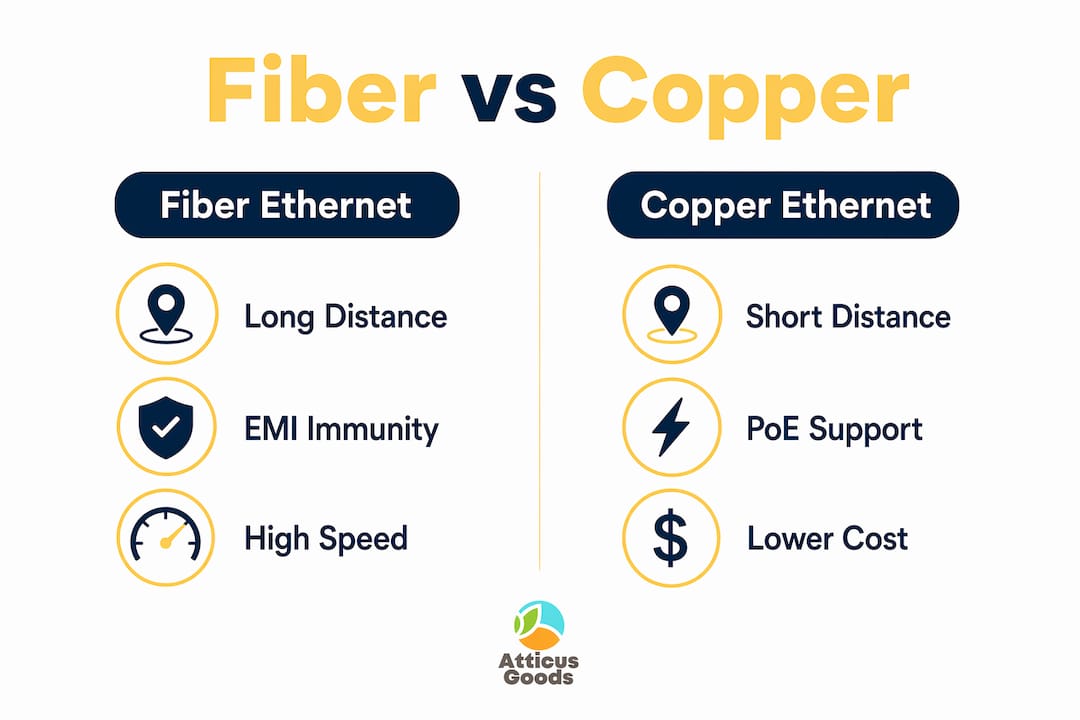
The table reveals the one hard limitation of fiber: fiber cannot carry PoE because it has no electrical conductors. Any device that draws power from the network, such as IP cameras, VoIP phones, or wireless access points, still needs a copper run or a media converter. This is why hybrid architectures are the industry norm. Fiber handles the backbone and uplinks between floors or buildings. Copper handles the last 10 to 30 meters to each powered endpoint.
Cost is the other honest consideration. Fiber cable itself is not dramatically more expensive than Cat6A, but the transceivers, SFP ports, and installation labor add up. A Netgear switch with SFP+ ports costs more upfront than a pure copper switch. The payoff comes in longevity. Fiber supports upgraded speeds by swapping transceivers rather than pulling new cable, which makes the total cost of ownership competitive over a five-to-ten-year horizon.
Pro Tip: When budgeting a fiber installation, get quotes that include OTDR testing and connector cleaning. Skipping verification testing is the most common reason fiber links underperform from day one.
How fiber optic Ethernet supports better business internet performance
Symmetrical speed is where fiber’s business case becomes concrete. Fiber networks deliver median upload speeds around 240 Mbps with latency near 14 to 15 ms, compared to cable networks averaging 40 to 43 ms latency. For a small business running video conferencing, cloud backups, VoIP, and point-of-sale systems simultaneously, that latency difference is the gap between a smooth workday and constant interruptions.
The scalability story is equally compelling. Most small businesses install fiber once and then grow into it.
| Speed Tier | Standard | Typical Use Case |
|---|---|---|
| 10 Gbps | 10GBASE-SR / 10GBASE-LR | Server-to-switch backbone |
| 25 Gbps | 25GBASE-SR | High-density virtualization |
| 40 Gbps | 40GBASE-SR4 | Storage area networks |
| 100 Gbps | 100GBASE-SR4 | Data center interconnects |
Moving from 10G to 25G or 40G on a fiber backbone requires only a transceiver swap on compatible switches. Copper networks at those speeds require new cable pulls, which means disruption, labor costs, and downtime. A small business that installs multimode OM4 fiber today can support 100G speeds on that same cable when the need arises.
Reduced network congestion is the third performance gain. Fiber links with lower latency and higher throughput reduce the queuing delays that cause jitter in VoIP calls and buffering in video streams. For businesses where ethernet vs Wi-Fi reliability is non-negotiable, fiber backbone connections eliminate the variability that wireless and copper introduce under load.
Common misconceptions about fiber optic Ethernet
Fiber is not automatically better in every scenario. Three persistent myths lead small business owners to either overspend or dismiss fiber prematurely.
-
“Fiber is always faster.” Fiber supports higher maximum speeds, but actual throughput depends on the switches, transceivers, and network configuration at both ends. A poorly configured fiber link can underperform a well-configured copper network.
-
“Fiber means no PoE problems.” PoE cannot traverse fiber under any standard configuration. Businesses that replace all copper with fiber and then discover their IP cameras have no power source face expensive retrofits. Plan hybrid architecture from the start.
-
“Any fiber cable will work.” Link budget determines reliability, not cable type alone. Optical power budgets must close with margin to produce a stable link. A fiber run that exceeds the loss budget of its transceiver will produce intermittent errors that are harder to diagnose than a simple copper fault.
-
“Installation is plug-and-play.” Connector cleanliness and proper termination critically affect fiber link reliability. Dirty connectors add optical loss and can push a marginal link into failure. OTDR testing after installation is standard practice, not optional.
-
“Fiber is too expensive for small businesses.” Entry-level SFP+ transceivers and switches with fiber uplink ports have dropped significantly in price. The Netgear ProSAFE line, for example, includes multi-gigabit switches with SFP ports at price points accessible to small business budgets.
How to integrate fiber optic Ethernet into your small business network
A practical fiber deployment for a small business follows a clear architectural logic: fiber for the backbone, copper for the edge.
-
Identify your backbone runs. Any cable run longer than 90 meters, any connection between floors, or any link between separate buildings is a candidate for fiber. These are the segments where copper’s 100-meter limit and EMI vulnerability create real risk.
-
Audit your PoE requirements. List every device that draws power from the network: access points, IP cameras, VoIP phones, door controllers. These endpoints need copper connections regardless of what the backbone uses. Plan your media converter or hybrid switch placement accordingly.
-
Choose the right fiber type. Multimode fiber (OM3 or OM4) covers runs up to 300 meters at 10G and suits most in-building deployments. Single-mode fiber handles runs beyond 300 meters and is the right choice for building-to-building links. A 10GBase-LR single-mode transceiver paired with single-mode cable covers distances up to 10 km on a single link.
-
Select switches with SFP or SFP+ ports. Structured cabling standards assign fiber for backbone and copper for access layer connections. A switch like the Netgear 24-Port Multi-Gigabit with SFP ports bridges both worlds, providing copper PoE ports for endpoints and fiber uplinks for backbone connectivity.
-
Work with a certified installer. Fiber termination and splicing require training and tools that go beyond standard IT work. A certified low-voltage contractor with fiber experience will deliver clean connectors, proper bend radius management, and OTDR test reports that verify every link before you rely on it.
-
Stage the deployment. Start with the highest-priority backbone links, verify performance, then expand. This approach limits disruption and lets you validate the architecture before committing to a full buildout.
Key takeaways
Fiber optic Ethernet outperforms copper on distance, interference immunity, and long-term scalability, making it the right backbone choice for any network that needs to grow beyond copper’s physical limits.
| Point | Details |
|---|---|
| Distance advantage | Fiber runs up to 100 km vs copper’s 100-meter limit, eliminating repeaters. |
| EMI immunity | Fiber transmits light, making it immune to electrical noise that degrades copper links. |
| PoE limitation | Fiber cannot carry PoE; plan hybrid copper-fiber architecture for powered endpoints. |
| Scalability | Upgrade from 10G to 100G by swapping transceivers, not pulling new cable. |
| Installation quality | Clean connectors and OTDR testing determine whether a fiber link performs reliably. |
The case for fiber is stronger than most small businesses realize
I have spent years watching small business owners delay fiber upgrades because the upfront cost felt hard to justify. The calculation almost always looks different in hindsight. The businesses that installed fiber backbone five years ago are now running 10G without a cable pull. The ones that stayed on copper are facing full re-cabling projects to hit the same speeds.
The hybrid architecture point is the one I find most underappreciated. People hear “fiber network” and picture a full rip-and-replace. The reality is that the smartest fiber deployments keep copper exactly where it belongs, at the edge, powering the devices that need PoE, covering the short runs where copper is cheaper and simpler. Fiber takes the backbone. That division of labor is not a compromise. It is the correct design.
The installation quality issue deserves more attention than it gets. A fiber link with dirty connectors or a marginal optical power budget will produce intermittent failures that are genuinely difficult to diagnose. I have seen IT teams spend days chasing what turned out to be a single contaminated connector. Paying a certified installer and requiring OTDR documentation is not overcautious. It is the difference between a network that works and one that almost works.
If you are deciding whether fiber is worth it for your setup, the honest answer is: it depends on your distances, your PoE requirements, and your five-year growth plan. But if any of those factors point toward fiber, the time to install it is before you need it, not after you have outgrown copper.
— Matthew Vista
Upgrade your network with fiber-ready gear from Atticus Goods
Building a fiber backbone starts with the right hardware, and Atticus Goods carries the switches and transceivers that make it practical for small businesses.
The Netgear 24-Port Multi-Gigabit PoE++ Smart Switch with SFP ports combines copper PoE ports for endpoints with fiber uplinks for backbone connectivity, which is exactly the hybrid architecture most small networks need. Pair it with a Netgear 10GBase-LR SFP+ transceiver for single-mode fiber runs up to 10 km. Browse the full networking catalog at Atticus Goods for switches, transceivers, and direct attach cables with next-day shipping across the United States.
FAQ
What is fiber optic Ethernet used for?
Fiber optic Ethernet connects network segments that exceed copper’s 100-meter distance limit, require immunity to EMI, or need speeds above 1G without cable replacement. Common applications include building-to-building links, server room backbone connections, and high-density office uplinks.
Can fiber optic Ethernet support PoE devices?
Fiber cannot carry Power over Ethernet because it has no electrical conductors. Devices that require PoE, such as IP cameras and wireless access points, need copper connections or a media converter between the fiber segment and the powered endpoint.
Is fiber optic worth it for a small business?
Fiber is worth the investment for any small business with cable runs longer than 90 meters, multiple floors or buildings to connect, or plans to scale beyond 1G speeds. The ability to upgrade to 25G or 100G by swapping transceivers rather than re-cabling makes fiber cost-effective over a five-to-ten-year horizon.
What is the difference between single-mode and multimode fiber?
Multimode fiber (OM3 or OM4) supports runs up to 300 meters at 10G and suits most in-building deployments. Single-mode fiber handles distances up to 10 km or more at 10G and is the correct choice for building-to-building or campus-scale links.
How do I know if my switch supports fiber optic connections?
Look for SFP or SFP+ ports on the switch. These small form-factor slots accept fiber transceivers for multimode or single-mode connections. Switches like the Netgear Business S3600 series include multiple SFP+ ports alongside standard copper ports for hybrid network designs.