

Wi-Fi 6, formally designated 802.11ax, is defined as the sixth generation of wireless networking and represents a fundamental shift in how routers manage multiple devices simultaneously compared to Wi-Fi 5 (802.11ac). The core difference between Wi-Fi 6 and Wi-Fi 5 is not raw speed alone. Wi-Fi 6 delivers up to 75% lower latency and theoretical peak speeds of 9.6 Gbps versus Wi-Fi 5’s 3.5 Gbps ceiling. More importantly, Wi-Fi 6 introduces OFDMA, MU-MIMO improvements, BSS Coloring, Target Wake Time, and mandatory WPA3 security. These features matter most in homes and offices where 10, 20, or 30 devices compete for bandwidth at the same time.
What is Wi-Fi 6 vs Wi-Fi 5: core technical differences
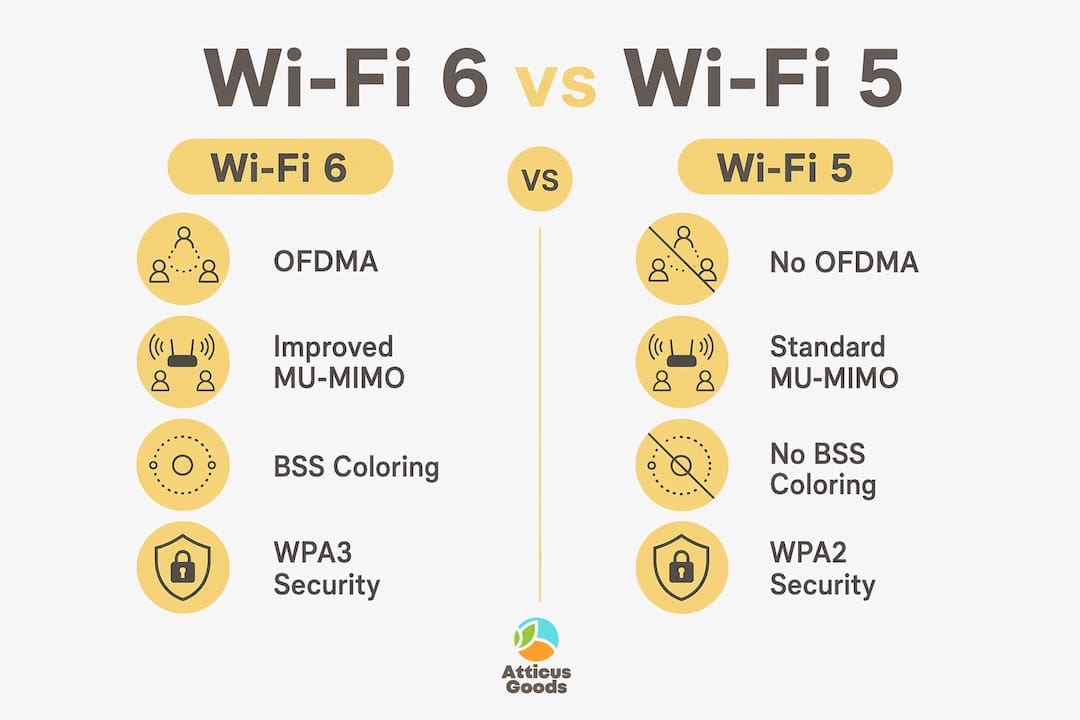
The most significant architectural change in Wi-Fi 6 is OFDMA, or Orthogonal Frequency Division Multiple Access. OFDMA allows simultaneous communication with multiple devices at once, while Wi-Fi 5 operates on a one-device-at-a-time model. Think of Wi-Fi 5 as a single checkout lane at a grocery store. OFDMA opens multiple lanes simultaneously, so your laptop, phone, smart TV, and security camera no longer wait in line behind each other.
Here are the key technical features that separate the two standards:
- OFDMA: Wi-Fi 6 splits channels into smaller sub-channels, serving multiple devices per transmission cycle. Wi-Fi 5 cannot do this.
- MU-MIMO streams: Wi-Fi 6 supports up to 8 spatial streams versus Wi-Fi 5’s 4, cutting queue buildup on busy networks.
- 1024-QAM modulation: Wi-Fi 6 uses 1024-QAM encoding, which improves raw throughput by 25% over Wi-Fi 5’s 256-QAM.
- BSS Coloring: Wi-Fi 6 tags transmissions so devices can ignore neighboring network interference, a critical advantage in apartments and dense office buildings.
- Target Wake Time (TWT): Smart home and IoT devices using Wi-Fi 6 negotiate scheduled sleep cycles, extending battery life significantly compared to always-on Wi-Fi 5 connections.
- WPA3 security: Wi-Fi 6 mandates WPA3 encryption. Wi-Fi 5 routers typically ship with WPA2, with WPA3 as an optional or absent feature.
Pro Tip: Before buying a Wi-Fi 6 router, check whether your most-used devices, including your phone and laptop, already support 802.11ax. Devices manufactured after 2019 from Apple, Samsung, and Intel frequently include Wi-Fi 6 chips, meaning you can take full advantage of the upgrade immediately.
Wi-Fi 6 represents a network management strategy shift that prioritizes concurrency over peak speed. That distinction matters more than any single benchmark number.

How Wi-Fi 6 and Wi-Fi 5 perform in the real world
Raw specification sheets rarely tell the full story. A single device on a Wi-Fi 6 network sees a speed improvement of only 10 to 25% over Wi-Fi 5 under ideal conditions. That is a modest gain. The picture changes dramatically once you add more devices to the network.
| Scenario | Wi-Fi 5 performance | Wi-Fi 6 performance |
|---|---|---|
| 1 to 3 active devices | Strong, near-peak speeds | Marginal improvement (10 to 25%) |
| 5 to 10 active devices | Noticeable slowdowns during peak use | Consistent speeds, reduced congestion |
| 15 or more active devices | Significant throughput degradation | 40 to 80% better aggregate throughput |
| Gaming or video calls | Latency spikes common | Up to 75% latency reduction |
| Dense urban apartments | High interference from neighboring networks | BSS Coloring reduces interference substantially |
The latency reduction deserves special attention. A 75% drop in latency transforms the experience for video conferencing on Zoom or Microsoft Teams, competitive gaming on platforms like Xbox or PlayStation, and real-time collaboration tools. Latency is the delay between sending a request and receiving a response. Cutting it by three quarters means your video call freezes less and your online game registers inputs faster.
“Theoretical speeds advertised rarely translate to end-user experience. Real benefits rise from multi-device efficiency and latency improvements, not peak speed numbers.” — ITU Online
Real-world throughput depends heavily on distance, building materials, and interference, not just the Wi-Fi standard. Concrete walls, metal appliances, and neighboring networks all reduce performance regardless of which standard you use. Wi-Fi 6 handles these conditions better, but no router eliminates physics.
Should you upgrade from Wi-Fi 5 to Wi-Fi 6?
The decision to upgrade depends on your specific environment, not a universal recommendation. Here is a structured way to evaluate whether the switch makes sense for you.
-
Count your connected devices. If your home or office network regularly runs 10 or more devices, including phones, laptops, smart speakers, thermostats, cameras, and streaming devices, Wi-Fi 6 delivers measurable improvements. Upgrading benefits users with internet plans above 500 Mbps or networks experiencing slowdowns with 10 or more active devices.
-
Check your internet plan speed. If your ISP delivers 500 Mbps or faster, Wi-Fi 5 may already be the bottleneck. Wi-Fi 6 removes that ceiling and lets you use the bandwidth you are paying for.
-
Assess your use cases. Smart home setups with Philips Hue, Ring, Nest, or similar IoT ecosystems benefit from Target Wake Time, which extends device battery life. Work-from-home setups with simultaneous video calls and file transfers benefit from OFDMA and lower latency. Gamers benefit from the latency reduction.
-
Consider your environment. If you live in a dense apartment building or a multi-story home, BSS Coloring and improved MU-MIMO make a practical difference. Suburban homes with few neighbors and open floor plans see smaller gains.
-
Evaluate alternatives first. Users with 3 to 5 devices and slower internet plans gain minimal benefit from upgrading. Before spending on a new router, consider repositioning your existing router, adding a mesh network node, or using a wired Ethernet connection for bandwidth-heavy devices like gaming consoles and desktop computers.
Pro Tip: When you do upgrade, replace your router and verify that your primary devices support Wi-Fi 6 before assuming you will see the full benefit. A Wi-Fi 6 router paired with Wi-Fi 5 devices still improves network management, but the device-level speed gains only appear on 802.11ax-compatible hardware.
How Wi-Fi 6 security compares to Wi-Fi 5
Security is one of the most underappreciated advantages in the Wi-Fi 6 vs Wi-Fi 5 comparison. Wi-Fi 6 mandates WPA3 as the required security protocol, while Wi-Fi 5 routers typically ship with WPA2, often with WPA3 as an optional or entirely absent feature.
The practical differences between WPA2 and WPA3 include:
- Brute-force attack resistance: WPA3 uses Simultaneous Authentication of Equals (SAE), which blocks offline dictionary attacks. WPA2’s handshake protocol is vulnerable to captured packet analysis, meaning attackers can attempt to crack passwords without staying connected to your network.
- Forward secrecy: WPA3 generates a unique encryption key for each session. If an attacker records your traffic and later cracks your password, they cannot decrypt past sessions. WPA2 does not offer this protection.
- Open network protection: WPA3 encrypts traffic on open networks, which matters for businesses offering guest Wi-Fi. WPA2 sends open network traffic in plain text.
- Simplified device onboarding: WPA3 includes Wi-Fi Easy Connect, which makes adding IoT devices to a network more secure using QR codes rather than shared passwords.
For home users, the WPA3 upgrade means stronger protection against neighbors or nearby attackers attempting to access your network. For small businesses, it means customer and employee data on the Wi-Fi network is better protected against interception. Most Wi-Fi 5 routers manufactured before 2019 do not support WPA3 at all, making the security argument for upgrading particularly strong for anyone running older hardware.
Key takeaways
Wi-Fi 6 outperforms Wi-Fi 5 most decisively in high-device-density environments, where OFDMA, improved MU-MIMO, and BSS Coloring deliver 40 to 80% better aggregate throughput and up to 75% lower latency.
| Point | Details |
|---|---|
| Core difference | Wi-Fi 6 manages multiple devices simultaneously; Wi-Fi 5 handles one device at a time. |
| Speed gains are modest alone | Single-device speed improves only 10 to 25%; real gains appear with 10 or more active devices. |
| Security is mandatory | Wi-Fi 6 requires WPA3; Wi-Fi 5 typically uses WPA2 with no forward secrecy. |
| Upgrade threshold | Upgrade if you have 10 or more devices or an internet plan above 500 Mbps. |
| IoT battery life | Target Wake Time in Wi-Fi 6 extends smart home device battery life beyond always-on Wi-Fi 5 behavior. |
Why the speed debate misses the point
I have been evaluating networking hardware for years, and the single biggest misconception I see is people upgrading to Wi-Fi 6 expecting to feel a dramatic speed boost on a single laptop. They run a speed test, see numbers similar to their old router, and conclude the upgrade was not worth it. That reaction is understandable and completely wrong.
The real test is what happens when your household hits peak usage. When two people are on video calls, a teenager is gaming, three smart home devices are reporting data, and a streaming device is pulling 4K content, that is when Wi-Fi 5 starts to crack. I upgraded a home network with 22 connected devices from a Wi-Fi 5 Netgear router to a Wi-Fi 6 Netgear Orbi system, and the difference was not visible on a speed test. It was visible in the complete absence of buffering, dropped calls, and gaming lag that had become routine.
The other thing most articles skip is the security angle. Running WPA2 in 2026 on a network with smart locks, cameras, and financial apps is a genuine risk. WPA3 is not a marketing feature. It is a meaningful protocol improvement that closes real attack vectors. If your router is more than four years old and still running WPA2, the security case for upgrading is as strong as the performance case.
My honest advice: do not upgrade for the speed numbers. Upgrade for the network stability, the latency reduction, and the security. Those are the benefits you will actually feel every day.
— Matthew Vista
Upgrade your network with Wi-Fi 6 gear from Atticus Goods
Atticus Goods carries a broad selection of Wi-Fi 6 routers and access points from Netgear, including the Netgear Orbi RBK753P for whole-home mesh coverage and the Netgear Nighthawk AX6 RAX50 for high-performance single-router setups. Whether you are upgrading a smart home with 20 connected devices or building out a small business network that needs reliable coverage across multiple rooms, Atticus Goods stocks the hardware to match your needs. Every order ships fast with next-day delivery across the United States. Browse the full range of consumer electronics and networking gear at Atticus Goods and find the right Wi-Fi 6 solution at a competitive price.
FAQ
What is the main difference between Wi-Fi 5 and Wi-Fi 6?
Wi-Fi 6 (802.11ax) adds OFDMA, improved MU-MIMO with up to 8 spatial streams, BSS Coloring, and mandatory WPA3 security compared to Wi-Fi 5 (802.11ac). The most practical difference is that Wi-Fi 6 handles multiple simultaneous devices far more efficiently, reducing congestion and latency.
Is Wi-Fi 6 noticeably faster than Wi-Fi 5?
On a single device, Wi-Fi 6 delivers only a 10 to 25% speed improvement over Wi-Fi 5 under ideal conditions. The performance gap widens significantly with 15 or more active devices, where Wi-Fi 6 delivers 40 to 80% better aggregate throughput.
Do I need a Wi-Fi 6 router if I have a slow internet plan?
If your internet plan delivers less than 200 Mbps and you have fewer than 5 connected devices, the upgrade offers minimal benefit. Wi-Fi 6 pays off most for users with plans above 500 Mbps or networks with 10 or more active devices.
Is WPA3 really better than WPA2 for home networks?
WPA3 blocks offline brute-force attacks and provides forward secrecy, meaning past sessions cannot be decrypted even if a password is later compromised. WPA2 lacks both protections, making WPA3 a meaningful security improvement for any network carrying sensitive data.
Can Wi-Fi 5 devices connect to a Wi-Fi 6 router?
Yes. Wi-Fi 6 routers are fully backward compatible with Wi-Fi 5, Wi-Fi 4, and older devices. Older devices connect at their native standard, while Wi-Fi 6 compatible devices take full advantage of the new features.
Recommended
- Ethernet vs Wi-Fi: Which Connection Is Right for You? – Atticus Goods
- Netgear WAX610 Wi-Fi 6 IEEE 802.11 a/b/g/n/ac/ax/i 1.80 Gbit/s – Atticus Goods
- Netgear RAX5 Wi-Fi 6 IEEE 802.11ax Ethernet Wireless Router - Atticus – Atticus Goods
- Netgear Nighthawk M6 MR6150 Wi-Fi 6 IEEE 802.11ax Ethernet Wireless – Atticus Goods