

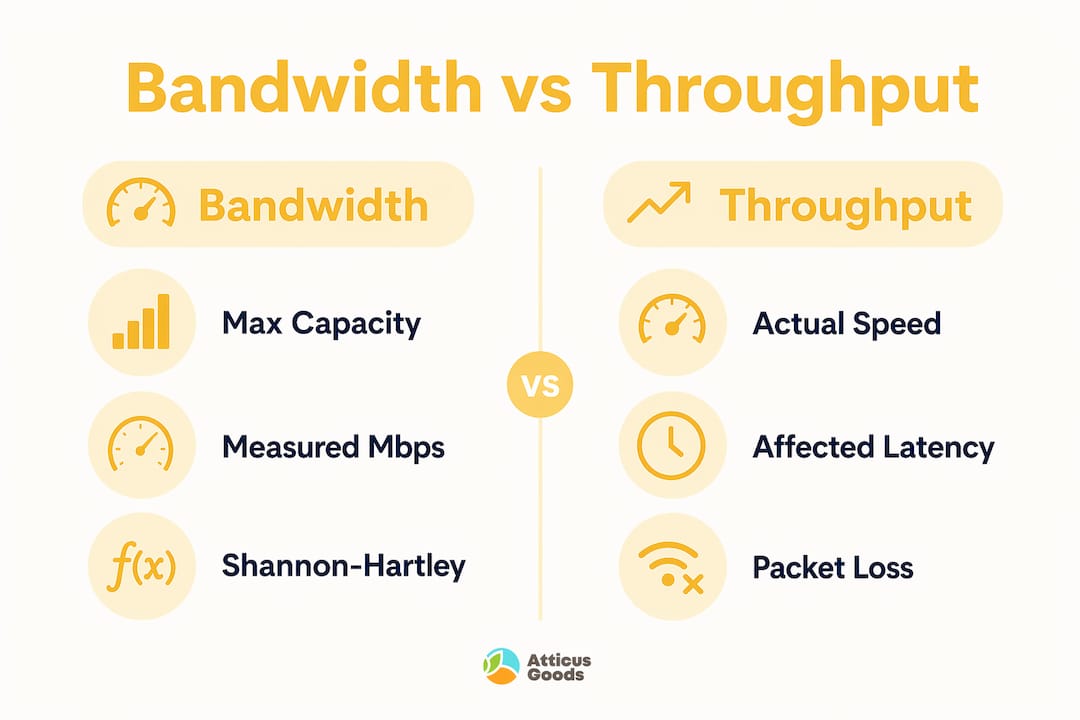
Network bandwidth is defined as the maximum volume of data a network connection can transfer within a given time period, measured in bits per second such as Mbps or Gbps. Most people use “bandwidth” and “speed” interchangeably, but they describe different things. Bandwidth is the pipe’s capacity. Speed is how fast water moves through it. Throughput is how much actually arrives. Understanding how network bandwidth works means grasping all three, because a fat pipe with poor conditions still delivers a slow experience.
How network bandwidth works: the core mechanics
Network bandwidth operates as a physical-layer property of your connection. Think of it as a highway with a fixed number of lanes. More lanes mean more cars can travel simultaneously, but traffic jams, accidents, and road quality all determine how fast those cars actually move. The maximum data transfer capacity of any connection is set by the medium itself, whether that is copper wire, coaxial cable, or fiber-optic glass.
Bandwidth, throughput, and latency are three distinct measurements that professionals track separately. Bandwidth measures maximum capacity, throughput measures actual successful delivery, and latency measures the delay between sending and receiving a signal. A 1 Gbps fiber connection with 2 ms latency performs very differently from a 1 Gbps cable connection with 40 ms latency, even though both advertise identical bandwidth. This distinction matters enormously for video calls, online gaming, and real-time financial transactions.

At the physical layer, the Shannon-Hartley theorem defines the absolute ceiling for data transmission on any channel. The signal-to-noise ratio of the medium sets that ceiling. Engineers improve effective bandwidth through better modulation schemes and error correction, not by simply widening the pipe. This is why fiber-optic connections outperform copper at the same nominal bandwidth: the signal degrades far less over distance.
How is network bandwidth measured and tested?
Measuring bandwidth accurately requires choosing the right method for the right question. Two primary approaches exist: active testing and passive monitoring.
Active testing injects controlled traffic into a network to measure its maximum capacity under load. Tools like iPerf and Ookla Speedtest are the most widely used. Active tests like iPerf provide a snapshot of peak performance under controlled conditions, which is useful for verifying a new installation or diagnosing a suspected bottleneck.
Passive monitoring analyzes real traffic flowing through the network without injecting test data. Tools like PRTG Network Monitor, SolarWinds, and Wireshark capture actual usage patterns over time. This approach reveals how bandwidth is consumed across devices and applications during normal operations.
The gap between these two methods explains why your advertised speed rarely matches your lived experience. Active tests measure the best-case scenario. Passive monitoring reveals the reality.
Key reasons measured throughput falls below advertised bandwidth include:
- Protocol overhead: TCP and IP headers consume a portion of every packet, reducing usable payload capacity.
- TCP window size: If the TCP window size does not match the Bandwidth-Delay Product of the link, the connection cannot fully utilize available capacity.
- Network congestion: Shared infrastructure, especially during peak hours, reduces available bandwidth for every user.
- Hardware limits: Older routers and network interface cards cap throughput regardless of the plan you pay for.
Pro Tip: Run iPerf tests at multiple times of day, not just once. A single test during off-peak hours will overstate your real-world available bandwidth by a significant margin.
What factors affect network bandwidth and overall performance?
Understanding what degrades bandwidth performance is more useful than knowing the theoretical maximum. Several factors consistently reduce throughput below the licensed bandwidth capacity.
- Network congestion: When multiple devices share a connection simultaneously, each competes for the same bandwidth pool. A household streaming 4K video on three devices while running a video call will saturate even a 200 Mbps plan.
- Latency and the Bandwidth-Delay Product: A 1 Gbps link with 50 ms RTT has a Bandwidth-Delay Product of approximately 6.25 MB. TCP must keep that much data in flight at all times to fully utilize the link. Most default TCP configurations do not achieve this on high-latency connections.
- Packet loss: Even 1% packet loss can severely collapse throughput on high-bandwidth, high-latency links. TCP congestion control algorithms interpret loss as a signal to reduce transmission rates aggressively, which compounds the problem.
- Protocol overhead: Every TCP/IP packet carries header data that does not count as useful payload. On small packets, this overhead represents a significant percentage of total bandwidth consumed.
- Hardware bottlenecks: A router with a 100 Mbps WAN port caps your throughput at 100 Mbps regardless of whether your ISP delivers 500 Mbps to the modem.
“Bandwidth should be viewed as a Layer 1 physical property; once data enters higher network layers, complex logic like congestion control impacts how much capacity is utilized.” — The Linux Code, Introduction to Bandwidth
The relationship between latency and bandwidth is frequently misunderstood. Upgrading from 100 Mbps to 500 Mbps will not fix a laggy video call if the root cause is 120 ms latency to the server. Latency is a delay problem. Bandwidth is a capacity problem. They require different solutions.
Pro Tip: Before upgrading your internet plan, run a packet loss test using tools like PingPlotter. If you see consistent loss above 0.5%, the problem is your connection quality, not your bandwidth tier.
How does bandwidth compare across different connection types?
Not all bandwidth is created equal. The technology delivering your connection determines both the ceiling and the consistency of your throughput.
| Connection type | Typical bandwidth range | Symmetrical? | Best use case |
|---|---|---|---|
| DSL (copper) | 1 to 100 Mbps | No | Light browsing, email |
| Cable (coaxial) | 25 to 1,200 Mbps | No | Streaming, remote work |
| Fiber-optic | 100 Mbps to 10 Gbps | Yes (most plans) | Video production, enterprise |
| Wi-Fi 6 (802.11ax) | Up to 9.6 Gbps theoretical | No | High-density device environments |
| Gigabit Ethernet | 1 Gbps | Yes | Workstations, servers, NAS |
Broadband connections are typically asymmetrical, meaning download bandwidth exceeds upload bandwidth. A cable plan advertising 500 Mbps might offer only 20 Mbps upload. This matters enormously for content creators, remote workers uploading large files, and businesses running hosted services. Fiber-optic and business-grade plans commonly offer symmetrical bandwidth, where upload and download capacity are equal.
Wired Ethernet connections consistently outperform Wi-Fi at the same nominal bandwidth. Wi-Fi introduces interference, signal attenuation, and shared medium contention that reduce effective throughput. For a deeper look at fiber optic advantages in business environments, the difference in reliability becomes even more pronounced at scale. The Ethernet vs. Wi-Fi tradeoff comes down to convenience versus consistent performance.
Enterprise networks operate in a different bandwidth tier entirely. A business running cloud-based ERP software, VoIP phones, video conferencing, and point-of-sale systems simultaneously requires not just higher Mbps but also quality of service (QoS) configuration to prioritize traffic. Retail businesses using modern POS systems depend on low-latency, reliable bandwidth to process transactions without interruption.
Practical tips for optimizing and managing your network bandwidth
Improving your effective bandwidth does not always require buying a faster plan. Most networks have recoverable performance sitting unused due to configuration and hardware issues.
- Upgrade your modem and router: A modem supporting DOCSIS 3.1, like the Netgear Nighthawk 2Gbps modem, removes a common hardware bottleneck that prevents you from receiving the full bandwidth your ISP delivers.
- Use wired Ethernet where it counts: Workstations, smart TVs, and gaming consoles connected via Ethernet eliminate Wi-Fi interference and deliver more consistent throughput. Upgrading to Ethernet reduces congestion on your wireless network for devices that genuinely need mobility.
- Enable QoS on your router: Quality of service settings let you prioritize video calls and streaming over background downloads and software updates.
- Monitor usage by device: Tools like GlassWire, PRTG, or your router’s built-in traffic monitor identify which devices or applications consume disproportionate bandwidth.
- Schedule heavy transfers: Large backups, system updates, and file uploads scheduled for off-peak hours free up bandwidth during working hours without requiring any plan upgrade.
- Upgrade to Wi-Fi 6 or Wi-Fi 6E: Modern routers using 802.11ax technology handle more simultaneous device connections with less congestion than older 802.11ac hardware.
The gap between paid bandwidth and actual throughput is usually caused by protocol overhead, congestion, or misconfigured network settings. Addressing those factors often delivers more improvement than doubling your plan tier.
Key takeaways
Network bandwidth defines the maximum data capacity of a connection, but actual performance depends on latency, packet loss, hardware quality, and protocol configuration working together.
| Point | Details |
|---|---|
| Bandwidth vs. throughput | Bandwidth is maximum capacity; throughput is what actually arrives after network conditions reduce it. |
| Packet loss is critical | Even 1% packet loss collapses throughput on high-bandwidth links due to TCP congestion control. |
| Wired beats wireless | Ethernet delivers more consistent throughput than Wi-Fi at the same nominal bandwidth tier. |
| Symmetrical matters for upload | Fiber and business plans offer equal upload and download; cable and DSL do not. |
| Hardware sets the ceiling | A router or modem with outdated specs caps your throughput regardless of your ISP plan. |
Why bandwidth alone never tells the whole story
Most conversations about network performance start and end with “how many Mbps do you have?” That framing misses the point almost entirely. I have worked with networks running 1 Gbps fiber plans that felt slower than a 100 Mbps cable connection because the router was three generations old and the TCP settings had never been touched.
The metric that actually predicts user experience is not bandwidth. It is the combination of latency, packet loss, and jitter. A 50 Mbps connection with 5 ms latency and zero packet loss will outperform a 500 Mbps connection with 80 ms latency and 0.5% loss for every real-time application. Video calls, gaming, and VoIP are latency-sensitive, not bandwidth-sensitive, past a certain threshold.
The other misconception I see constantly is treating bandwidth as a fixed resource you either have or do not have. In reality, effective bandwidth is something you configure and manage. QoS settings, TCP tuning, hardware upgrades, and traffic scheduling all move the needle without touching your ISP plan. Most home and small business networks run at a fraction of their potential because nobody has looked at the configuration since installation.
My honest recommendation: before you call your ISP to upgrade, spend 30 minutes with a tool like iPerf or PingPlotter. You will almost always find the bottleneck is local, fixable, and free to address.
— Matthew Vista
Upgrade your network hardware with Atticus Goods
Understanding how bandwidth works is the first step. Having the right hardware to support it is the second.
Atticus Goods carries a broad selection of networking hardware from trusted brands like Netgear, designed to remove the bottlenecks that prevent you from using the bandwidth you are already paying for. From the Netgear DOCSIS 3.1 cable modem built for gigabit connections to enterprise-grade switches like the Netgear GS728TXUPv3 for managing high-traffic business networks, the right equipment makes a measurable difference. Browse the full range of networking products at Atticus Goods with next-day shipping across the United States.
FAQ
What is the difference between bandwidth and internet speed?
Bandwidth is the maximum capacity of your connection to carry data, measured in Mbps or Gbps. Internet speed refers to how fast individual data transfers complete, which is always lower than bandwidth due to latency, congestion, and packet loss.
How do I measure my actual network bandwidth?
Use active testing tools like iPerf for controlled maximum-capacity tests or Ookla Speedtest for a quick snapshot. For ongoing monitoring, passive tools like PRTG Network Monitor or Wireshark reveal real-world usage patterns over time.
Why is my internet slow even with high bandwidth?
High bandwidth does not guarantee fast performance. Latency, packet loss, outdated router hardware, and TCP configuration issues all reduce effective throughput well below your advertised plan capacity.
What is the difference between symmetrical and asymmetrical bandwidth?
Symmetrical bandwidth provides equal upload and download capacity, common on fiber-optic and business-grade plans. Asymmetrical bandwidth offers higher download than upload speeds, which is standard on residential cable and DSL connections.
How does packet loss affect bandwidth performance?
Even 1% packet loss can severely reduce throughput on high-bandwidth connections because TCP congestion control algorithms cut transmission rates sharply when they detect lost packets, creating a compounding slowdown effect.